How to Make Your Videos Responsive in WordPress with FitVids - Best Webhosting
Thanks! Share it with your friends!
 ULTRAFAST, CHEAP, SCALABLE AND RELIABLE! WE STRONGLY RECOMMEND ACCU
WEB HOSTING COMPANY
ULTRAFAST, CHEAP, SCALABLE AND RELIABLE! WE STRONGLY RECOMMEND ACCU
WEB HOSTING COMPANY

Watch Wordpress WPBeginner Video: How to Make Your Videos Responsive in WordPress with FitVids.
When you embed a video by default these videos are not responsive on your site. Users visiting your site with a smaller screen size will see video containers of the wrong size. In this video, we will show you how to make your videos responsive in WordPress with fitvids.
If you liked this video, then please Like and consider subscribing to our channel for more WordPress videos.
Text version of this tutorial:
http://www.wpbeginner.com/plugins/how-to-make-your-videos-responsive-in-wordpress-with-fitvids/
Check us out on Facebook:
https://www.facebook.com/wpbeginner
Follow us on Twitter:
http://twitter.com/wpbeginner
Join our circle on Google+:
https://plus.google.com/+wpbeginner/
Checkout our website for more WordPress Tutorials
http://www.wpbeginner.com/
Summary of this Tutorial:
Start by installing and activating the FitVids for WordPress plugin.
Then go to Appearance, FitVids to enter a css selector class.
WordPress automatically adds .post class to your articles so you can use that.
Save changes and now all of your videos should be responsive.
Related Links:
FitVids for WordPress
http://wordpress.org/plugins/fitvids-for-wordpress/
Related Videos
-
Popular

Best Video Gear For Creating Screencast Videos Like A Pro - How I make my videos
Added 123 Views / 0 LikesBest Video Gear For Creating Screencast Videos Like A Pro More info: https://www.wpcrafter.com Here are the links to my gear: Webcam: https://www.wpcrafter.com/best-webcam Lighting: https://www.wpcrafter.com/best-lighting Microphone: https://www.wpcrafter.com/best-microphone Software: https://www.wpcrafter.com/best-screencast-software In this video I go over all the equipment that I use to create my videos. ~~~~~~~~~~~~~~~~~~~~~ All of my opinions in
-

MY VIDEOS USED TO SUCK!!! | HOW TO MAKE BETTER VIDEOS
Added 90 Views / 0 LikesHow to Make Better YouTube Videos. My First YouTube Videos Were Not Great. If You Want to Know How to Make Better YouTube Videos it comes down to a few basic things... HOW TO MAKE BETTER VIDEOS FOR YOUTUBE - Improve On-camera charisma and energy - Learn to Structure and Research Videos - Figure Out What Camera Gear You Need - Learn the Settings for Your Gear - Learn Proper Film Techniques - Create a System or Formula for Making Videos Consistently GET
-
Popular
How To Make It Responsive | CSS Card Hover Effects | Html CSS Responsive Design
Added 134 Views / 0 LikesPart 1 : https://www.youtube.com/watch?v=9pXGz6Dv3q0 Please LIKE our Facebook page for daily updates... https://www.facebook.com/Online-Tutorial-Html-Css-JQuery-Photoshop-1807958766120070/ Track: Skylike - Dawn Link: https://youtu.be/Jg9nDEtqWV0
-
Popular

How to Make A Passive Income Online With A Mobile Responsive Website - Responsive Web Design Guide
Added 147 Views / 0 LikesHere's how to make a passive income online with a mobile responsive website. No passive income guide would be complete without talking about mobile responsive web design. Mobile devices are becoming more and more popular. Which means more of your traffic will be coming from mobile devices. Because it is harder to buy products or services from mobile devices your revenue per visitor will drop like a stone unless you optimize your site for mobile conver
-
Popular

Make $3,000 PER DAY Posting LoFi Beats Videos (Make Money on YouTube)
Added 145 Views / 0 LikesLearn how to make $3,000 a Day by posting simple LoFi Beats videos. This is one of the best ways to make money on YouTube. Follow this complete step by step tutorial. ► My YouTube Course: Grow a YouTube Channel from Zero Subscribers FAST: https://www.jetvideoacademy.com/jva-2022-get/ A recent popular topic is "how to make money on YouTube without making videos" - however it's always best to try and create your own original content. So I've decided to
-

Post Simple Videos & Make $20,000+ a Month - FULL TUTORIAL (Make Money Online)
Added 75 Views / 0 Likes• My #1 Recommendation To Make a Full-Time Income Online. CLICK HERE • • http://OnlineProfitz.com • Get Content Samurai • https://www.contentsamurai.com/c/lkpromo-cs-freetrial • SUBSCRIBE Here For MORE Ways To Make Money ONLINE! •️ http://bit.ly/SubscribeS2TPMoneyTactics • Hey guys, welcome back to another money making video! In this one I'm showing you How to Post Simple Videos & Make $20,000+ a Month - FULL TUTORIAL (Make Money Online) If you're loo
-
Popular
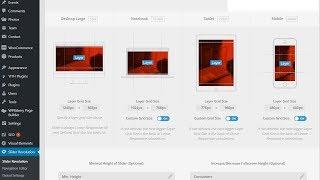
How To Make Responsive WordPress Sliders?
Added 121 Views / 0 LikesIn today's video, we'll see how to make responsive WordPress sliders, using Revolution Slider WordPress plugin you'll learn how to make your slideshows responsive, how to test it and how to customize this slider show in different screen sizes to make it looks awesome in every single screen size. WordPress themes download https://visualmodo.com/wordpress-themes/ Revolution slider plugin usage guide https://visualmodo.com/knowledgebase/using-revolution-
-

How to make a responsive footer with Elementor Pro in Wordpress
Added 77 Views / 0 LikesHe guys, in this video I'm answering a question via a quick tutorial about creating a footer template in Elementor Pro on Wordpress. I first designed this in Adobe XD to be clear, I didn't use a template. I hope you like this quick run and gun style video. The affiliate link for Elementor Pro is the third link below. Thanks a lot for your support. → Software that I use Hosting & Domain provider I use on all my websites: https://www.siteground.com/go/l
-
Popular

The 4 Best Ways To Add Videos On A WordPress Website For Sales Videos & Online Courses
Added 145 Views / 0 LikesThe 4 Best Ways To Add Videos On A WordPress Website For Sales Videos & Online Courses More Info: https://www.wpcrafter.com/create-an-online-course-with-wordpress/ Many people ask me what is the best way to add videos on their website. Also how to secure those videos. Well in this video I go over the 4 best options to do that, including exactly how I host my videos online! ~~~~~~~~~~~~~~~~~~~~~ All of my opinions in this video are my own, I was not pa
-
Popular

The Stuff I Use to Make My Videos
Added 124 Views / 0 LikesI made a new version of this video! : https://www.youtube.com/watch?v=apOcONUpp5g Quick video on the kit I use to make my videos. Basically: Canon 70d Rode Shotgun Mic Blue Snowball desktop Mic Screen flow software for Mac More videos at http://www.wpeagle.com
-
Popular

Should You Make 4K Videos For YouTube Yet?
Added 126 Views / 0 LikesAre People Ready to Watch 4K Video On YouTube? 2017 might actually be the year Uploading 4K Video on YouTube becomes practical. Watching 4K Video on YouTube is more likely now that 4K Televisions are more affordable and so are 4K monitors. 4K video is now even on nearly every smartphone. It's time to start taking this seriously. I'm going to try to do 100+ Videos in 4K Resolution this year. I don't think that I'm going to go strictly to 4K video, but
-
What Equipment Do I Use To Make HQ Videos
Added 87 Views / 0 LikesI am so excited about this video! In this video I show you what equipment and software I use to make high quality video's! So if you want to know more about that, watch this video! In the future I will make a more in depth tutorial about it (or more than one) so you can really start to make video's yourself. A lot of things I show you in this video are not 100% necessary. I use a lot to make the video better, while you also can create great stories us









