How to Apply a Gradient Text Color to Your Copy Using Divi’s Built in Options Only - Best Webhosting
Thanks! Share it with your friends!
 ULTRAFAST, CHEAP, SCALABLE AND RELIABLE! WE STRONGLY RECOMMEND ACCU
WEB HOSTING COMPANY
ULTRAFAST, CHEAP, SCALABLE AND RELIABLE! WE STRONGLY RECOMMEND ACCU
WEB HOSTING COMPANY
Watch Wordpress Elegant Themes Video: How to Apply a Gradient Text Color to Your Copy Using Divi’s Built in Options Only.
No matter what kind of website you’re creating, highlighting copy and content remains one of the top priorities. With Divi’s built-in options, there are a ton of ways to get there. One of the possibilities you have is applying a gradient text color to your copy. This is a great approach for adding color to your website, especially if you’re keeping the rest of your website clean and minimalistic. It helps to balance whitespace and it gives your website a breath of fresh air.
In this tutorial, we’re going to show you how to give your text a gradient color using Divi’s built-in options only.
Read more: https://www.elegantthemes.com/blog/divi-resources/how-to-apply-a-gradient-text-color-to-your-copy-using-divis-built-in-options-only
Related Videos
-
Popular
How to Create an Abstract Gradient Hero Section with Divi (6 Gradient Color Palettes!)
Added 144 Views / 0 LikesGradients can easily elevate your web design. Usually, they’re used in a subtle way. But you can also create sections on your website that are exclusively made out of gradients combinations. They make your design look modern and abstract at the same time. To help illustrate that, we’re going to recreate a section that’s made exclusively out of gradient colors. On top of that, we’ll share 6 different gradient color palettes that you can apply to the re
-
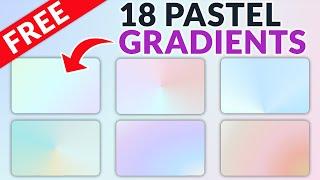
18 FREE Pastel Gradients Built with Divi’s Gradient Builder
Added 38 Views / 0 Likes🌈 18 FREE pastel gradients ➡ https://www.elegantthemes.com/blog/divi-resources/18-free-pastel-gradients-built-with-divis-gradient-builder Adding a gradient to your website is a great way to integrate color and add an interesting background to your page. Pastel gradients look especially stunning in web design since they use lighter colors to create subtle blends, enhancing the page without being too overpowering. With Divi’s new gradient builder, desig
-

How to Create Parallax Copy Transitions with Divi’s Sticky Options
Added 67 Views / 0 LikesWhen you’re looking for creative ways to spice up your page designs, parallax effects can come in handy. They bring that extra interaction on scroll without being too invasive. If you’re looking for a way to extend that parallax effect to multiple sections on your page, you’re going to love this tutorial. Today, we’ll show you how to create parallax copy transitions with Divi’s sticky options. As soon as visitors scroll past a certain section, the cop
-
Popular
5 Ways to Make Your Copy Pop with Divi’s Hover & Transform Options
Added 129 Views / 0 LikesOver the past few weeks, the new Divi transform options have helped spark our creativity. One of the best things about the transform options is the visual “pop” that comes with using it. With just a few tweaks, you can change the overall user experience of any module, row, section or page you’re working on. In this post, we’re going to show you how to combine these awesome transform options with Divi’s hover options. More precisely, we’re going to mak
-
Popular

Introducing The New Divi Background Options Interface & Gradient Backgrounds
Added 119 Views / 0 LikesLearn more here! https://www.elegantthemes.com/blog/theme-releases/divi-background-options
-
Popular
Color Picker in Sublime Text | Easy to pick any color in text editor
Added 138 Views / 0 LikesHow to Install and Use Color Picker Package in Sublime Text. Color Picker is a package/plugin for text editors so that you can easily pick a color code for your file with a simple shortcut. In sublime text editor you can install Color Picker Package to easily pick any color code very fast. It is one of the best package. This is a Part 4 of Sublime Tutorials Series, you can check all videos in which you will learn many shortcuts for Sublime Text Editor
-
Popular
DIVI FEATURE UPDATE LIVE | Background Options Interface & Gradient Backgrounds
Added 132 Views / 0 LikesThe demonstration starts at 0:02 Divi’s sections, rows, columns and modules have a lot of background options. Previously, these options for background colors, images and videos, including sub-settings for parallax modes, background image and video sizes and color transparency were found in one big long list inside of the Design tab. The sheer amount of settings made it difficult to navigate and it was often unclear, at a glance, what background styles
-
Popular
Animated Gradient on Text in CSS Using background-clip text - Text Background Animation Effects
Added 123 Views / 0 LikesPlease LIKE our Facebook page for daily updates... https://www.facebook.com/Online-Tutorial-Html-Css-JQuery-Photoshop-1807958766120070/ Track: Skylike - Dawn Link: https://youtu.be/Jg9nDEtqWV0
-
Popular

Divi Feature Update! Introducing Brand New Text Shadow Options For All Modules
Added 106 Views / 0 LikesLearn more here: https://www.elegantthemes.com/blog/theme-releases/divi-text-shadows Today we are excited to add even more design customizability to Divi with our brand new Text Shadows options that make it incredibly easy to add stunning shadow to any Divi module and to customize those shadows using a simple visual interface. Adding great text shadows to your page is super simple thanks to our shadow presets that can be applied to any text element wi
-
Popular
Divi Feature Update LIVE! The New Divi Color Manager & Magic Color Suggestions
Added 113 Views / 0 LikesThe demonstration starts at 8:32 We introduced the all-new color manager for Divi, a pretty magical new interface that makes it easier to manage colors, access recently used colors and explore the colorscape for new and beautiful color palettes for your website. Whenever you edit a color in the Visual Builder, you get quick access to your customizable website color palette. This is great when you have already decided on a color scheme, but during your
-
Popular

How to Use Divi’s Text and List Style Options for Unique Toggle and Accordion Content Designs
Added 128 Views / 0 LikesMultistreaming with https://restream.io/ Hey Divi Nation, welcome to a brand new Divi Use Case live stream where each week we show you how to add new design and functionality to your Divi website. In this tutorial, I’m going to show you how to use Divi’s text and list style options for unique toggle and accordion content designs. This will come in handy whenever you want to incorporate different text designs without having to use CSS classes or inline
-
Popular

Divi feature update LIVE | Introducing Brand New Text Shadow Options For All Modules
Added 130 Views / 0 LikesToday we are excited to add even more design customizability to Divi with our brand new Text Shadow options that make it incredibly easy to add stunning shadow to any Divi module and to customize those shadows using a simple visual interface.









