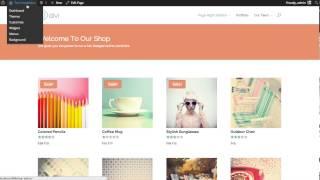
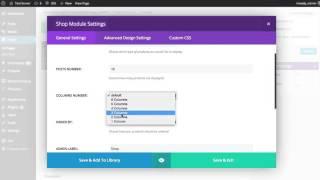
How to Change The Divi Shop Module’s Mobile Column Breakpoint - Best Webhosting
Thanks! Share it with your friends!
 ULTRAFAST, CHEAP, SCALABLE AND RELIABLE! WE STRONGLY RECOMMEND ACCU
WEB HOSTING COMPANY
ULTRAFAST, CHEAP, SCALABLE AND RELIABLE! WE STRONGLY RECOMMEND ACCU
WEB HOSTING COMPANY
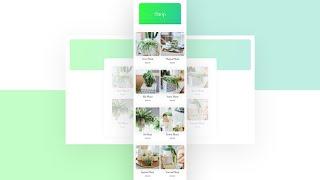
Watch Wordpress Elegant Themes Video: How to Change The Divi Shop Module’s Mobile Column Breakpoint.
By default, as soon as you switch over to a mobile device, the shop module turns into a one-column layout. Now, if you’re looking to highlight each product individually, that’s great, but with the bigger smartphone screen sizes nowadays, you might want to allow two products to appear next to each other when using the Shop Module.
In today’s Divi tutorial, we’ll show you how to change the shop module’s mobile breakpoint using CSS, allowing two products to appear next to each other on most modern smartphones. This is a great tutorial to have within reach if you’re setting up an online shop in the future! You’ll be able to download the design’s JSON file for free as well!
Read more: https://www.elegantthemes.com/blog/divi-resources/how-to-change-the-divi-shop-modules-mobile-column-breakpoint
Related Videos
-
Popular
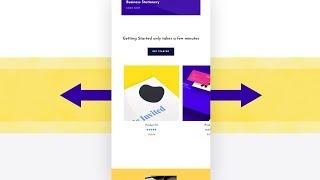
Turning Divi’s Shop Module into Dynamic Product Swipe Cards on Mobile
Added 101 Views / 0 LikesWhen building a landing page for specific products, whether it’s a new launch or a sale you’re preparing for, chances are high you’ll use the Shop Module at some point. Divi’s Shop Module allows you to dynamically pull products from the WooCommerce plugin and style the products using Divi’s built-in options. Now, by default, the shop module comes with a few column structures that all translate into two columns on smaller screen sizes. This means that
-
Popular

How To Adjust Divi’s Column Stacking Order on Mobile Devices
Added 122 Views / 0 LikesToday I am going to show you two ways you can change Divi’s column stacking order on mobile Devices. The first involves creating an alternate version of the content specifically for mobile devices using the “Disable On” feature within Divi. The second way is to use custom CSS to add classes to your columns which designate their order on Mobile. Read article: https://goo.gl/ML3PaB
-
The Divi Shop Module
Added 95 Views / 0 LikesDivi has been designed to be WooCommerce compatible. To integrate WooCommerce you will need to install the latest version of WooCommerce. View The Full Documentation Page: https://www.elegantthemes.com/documentation/divi/ecommerce-divi/
-
Popular
How to Stunningly Combine Divi’s Column & Module Backgrounds with Blend Modes
Added 113 Views / 0 LikesWith all various Divi built-in options and regular feature updates, the quality of the websites designs you create can go up quickly. One of the feature updates that was long expected was the filters and blend modes one. We’ve already shared some great examples that you can recreate and we’d like to add one to that list; how to stunningly combine Divi’s column and module backgrounds. Blend modes work like layers do within Photoshop; once you apply a b
-

How to Create Mobile Walkthroughs with Divi’s Slider Module
Added 97 Views / 0 LikesSliders have always been really popular in web design. One of their biggest advantages is the fact that visitors can swipe through them on mobile devices. Nowadays, swiping is the new clicking, so it goes without saying that including sliders can help improve the mobile user experience visitors have on your website. When building a website with Divi, you can easily add the Slider Module to any row or section you’re working on. And with a bit of creati
-
Popular

The New Divi Column Options & Column Editing Interface!
Added 141 Views / 0 LikesLearn more here: https://www.elegantthemes.com/blog/theme-releases/the-new-divi-column-options-column-editing-interface Today we are excited to release the new Divi column options and improved column editing interface for the Visual Builder. This updates brings tons of new design options to columns and separates each column on your page into its own unique builder element, giving you more control over the design and position of each. The improved inte
-
Popular

How to Create a Themed Three Column “Heavy Metal” Audio Section with Divi’s Audio Module
Added 131 Views / 0 LikesToday, we are going to be designing a tri-part audio module that includes space for an audio player, a short bio, and a call-to-action button--in case you want to direct visitors to i-Tunes or Google Play to download your latest hits. Read the blog post and get the code here: https://www.elegantthemes.com/blog/divi-resources/how-to-create-a-themed-three-column-audio-section-with-divis-audio-module
-
Popular

#SelfMade The Mobile Vintage Shop Wix Story
Added 122 Views / 0 LikesWhen Tiffany Nicole got priced out of her SoHo boutique, she came up with an innovative way to bounce her business back. Second place winner in Wix's #SelfMade filmmaking contest! Check out The Mobile Vintage Shop's Wix website: http://www.themobilevintageshop.com/ A film by Nikki Miller: http://www.maebfilms.com/ Launch your career with a professional looking website. Get started at: http://www.wix.com Watch more at: http://www.wix.com/stories https:
-
How to Change the Number of Columns in the Divi Blog Module
Added 49 Views / 0 LikesDivi’s blog module can display blog posts in either a fullwidth or grid layout. If you choose the grid layout, the maximum amount of columns you can have is three. In this tutorial, we are going to explore combining the power of CSS Grid with the Divi Blog module to create any number of columns you want. With just a few snippets of CSS, your blog will transform into a beautiful multi-column grid layout. Plus, the columns will be fluidly responsive wit
-

How to Trigger Hover Effects for a Module, Column, and Row Simultaneously
Added 80 Views / 0 LikesOne of the best things about building a site with Divi is that each building block is packed with design options. Every module, column, row, and section contains design settings for both the default and the hover state. This opens the door for triggering multiple hover effects when combining this elements together. In this tutorial, I’m going to show you how to simultaneously trigger hover effects for a module, column and row. The trick is to make sur