Twenty Twenty One Theme Tutorial - Create a Pro Website! - Best Webhosting
Thanks! Share it with your friends!
 ULTRAFAST, CHEAP, SCALABLE AND RELIABLE! WE STRONGLY RECOMMEND ACCU
WEB HOSTING COMPANY
ULTRAFAST, CHEAP, SCALABLE AND RELIABLE! WE STRONGLY RECOMMEND ACCU
WEB HOSTING COMPANY
Watch Website Creative Pro Video: Twenty Twenty One Theme Tutorial - Create a Pro Website!.
The Twenty Twenty One theme is one of the best free themes to come out by WordPress. It's minimalistic, easy to customize and works well with the default block editor. Hosting for this tutorial - https://websitecreativepro.com/bluehost
The Twenty Twenty One theme is more of a "blank slate" style theme (sort of like the Hello theme for Elementor) that works really well with the default gutenberg editor. All you need to create a really impressive looking website is a few plugins like my personal favorite, Stackable and an easy to follow tutorial like this one.
You can create a beautiful looking homepage and effective looking blog posts. This theme is great if you've been looking to create any sort of niche website or pro blog. No it does not have a sidebar, but again sidebars are not particularly helpful to your visitors
•
• W E B H O S T I N G
• Blue Host is the #1 recommended web host by WordPress and is the host we use in this tutorial. They are perfect to start with and provide all the resources and tools you need to grow a high traffic website/blog:
https://websitecreativepro.com/bluehost
• D O M A I N N A M E S
• I suggest Namecheap as your domain name registrar. They are my registrar of choice. Great prices, free whois protection and good support.
https://websitecreativepro.com/namecheap
•
• T I M E S T A M P S
This tutorial is made up of two parts, the website setup part and the design section. If you already know how to setup WordPress just skip ahead.
00:00 Start
00:52 Website Setup
20:35 Hero Image / Welcome Message
36:54 Homepage visual menu
52:58 Bio and email
59:01 Logo / favicon /menu
01:06:18 Essential Pages
1:19:30 Blog Post
1:25:46 Breadcumbs
1:31:46 Related Posts
1:33:48 Hide Powered by WP
1:35:38 Conclusion
•
S U B S C R I B E
• Hey I'm David. I'm a professional blogger, web designer and highly rated UX consultant.
• Subscribe if you're enjoying the videos here - https://goo.gl/ZuLpFA
#makeawebsite
DISCLAIMER: This video and description contain affiliate links when possible, which means that if you click on one of the product links, I may receive a small commission. I only recommend products and services I actually use. Everything in this video is based on information acquired from years of online web development experience. Please do your own research before making any important decisions. You and only you are responsible for any and all digital marketing decisions you make. Thank you for watching and subscribe!
Related Videos
-
WordPress Twenty Twenty-Three Tutorial: Create a 100% Custom Theme Design for Your Website
Added 84 Views / 0 LikesDesign your WordPress site from top-to-bottom using the full site editing (FSE) feature that comes with block-enabled themes! In this tutorial, we'll create a custom design using the WordPress Twenty Twenty-Three theme, which is free. https://wordpress.org/themes/twentytwentythree/ Download the tutorial guide below to follow along at your own pace, and get all the assets (color palette, images, video, font): https://websiteprofitcourse.com/go/dl?tutor
-
Popular

How To Create a Website with the Twenty Twenty Theme From WordPress Made Easy
Added 162 Views / 0 LikesWelcome to a full length tutorial on how to create a website with the Twenty Twenty theme from WordPress. The Twenty Twenty theme is a free theme that came out as the default theme for WordPress in 2020. Web host used in the tutorial: https://hostinger.com/webpro It's a good free theme that is perfectly designed for content oriented websites and blogs that will make money from advertising and affiliate marketing. Now of course it's a not a perfect the
-

WordPress Twenty Twenty-Three Theme Tutorial: How to Make a Website with Full Site Editing (FSE)
Added 53 Views / 0 LikesVisually design your next website with WordPress using their full site editing feature! In this tutorial, we'll build on the WordPress Twenty Twenty-Three theme, which is free — https://wordpress.org/themes/twentytwentythree/ You'll get an overview of the templates that run your entire website and how to customize them from header to footer. You have complete control without needing advanced code knowledge by making your layout using pre-defined style
-

Create a Website With The Twenty Twenty Two Theme from WordPress!
Added 80 Views / 0 LikesIn this complete website tutorial, I walk you through the entire process from step 1 to step done on how to create a beautiful, responsive, high converting website using the Twenty Twenty Two theme. Get started: https://davidutke.com/hosting The Twenty Twenty Two theme is a complete departure from previous flagship WordPress themes because it now uses something called "full site editing" which allows you the user to edit and adjust different templates
-

WordPress Full Site Editor Tutorial: How to Customize Twenty Twenty-Two Theme from Header to Footer
Added 51 Views / 0 LikesLearn how to customize your blog or business website using the new WordPress full site editor tutorial. In this tutorial, we'll use the WordPress Twenty Twenty-Two theme which is the first with full site editing built in! Download the tutorial assets & setup instructions: https://websiteprofitcourse.com/fse-assets The best way to support or say "thanks" is to start your website idea! If you use my affiliate links, I get a small cut (no extra cost to y
-
Popular
WordPress Twenty Twenty-Three Theme TUTORIAL (2023): Komplette Anleitung (Editor, Menü, Stile...)
Added 136 Views / 0 Likes✅ Das Neue WordPress Buch 2023 (Kostenlos): https://lp.wperfolg.de/f1/gratis-website-buch/ ✅ An 1 Tag Deine eigene Wunsch-Website erstellen (ohne zu programmieren): https://lp.wperfolg.de/spezielle-website-masterclass/ ▬▬▬▬▬▬▬ Videoinhalt ▬▬▬▬▬▬▬ Teile jetzt das Video "WordPress Twenty Twenty-Three Theme TUTORIAL (2023): Komplette Anleitung (Editor, Menü, Footer, Customizer, Stile...)" mit deinen Freunden! :) Du erfährst im Video ganz genau, wie Du da
-
Twenty Twenty-Two WordPress Theme (Überblick): Full Site-Editing Tutorial, Menü anpassen & mehr...
Added 51 Views / 0 Likes✅ Das Neue WordPress Buch 2021 (Kostenlos): https://lp.wperfolg.de/f1/gratis-website-buch/ ✅ PROBLEME mit WordPress? Hier geht's zur Website-Komplettlösung: https://klick.wperfolg.de/l/website-formel-yt-bes-alle-videos ▬▬▬▬▬▬▬ Videoinhalt ▬▬▬▬▬▬▬ Teile jetzt das Video "Twenty Twenty-Two WordPress Theme (Überblick): Full Site-Editing Tutorial (2022 Editor), Menü anpassen und Footer bearbeiten & mehr..." mit deinen Freunden! :) In diesem kompakten Video
-
Popular

WordPress Twenty Twenty Theme Tutorial for Beginners
Added 135 Views / 0 LikesIf you want the easiest way to start your blog as a beginner, install WordPress and use their FREE theme, Twenty Twenty! In this tutorial and demo, you'll learn how to customize the WordPress Twenty Twenty theme to get a unique look for your blog or website. I recommend that you create a child theme before you begin to make customizations. Links mentioned: • FREE WordPress 101 Training - https://websiteprofitcourse.com/dl03 • 14 Day Blog Launch - http
-
Popular

Twenty Twenty Theme Tutorial: Make a Website From Step 1 to Step DONE!
Added 110 Views / 0 LikesThe Twenty Twenty theme from WordPress is one of my current favorite free themes if you know how to use it. In this how to make a website tutorial, I'm going to show you how to get the most out of this excellent free WordPress theme. https://websitecreativepro.com/bluehost The Twenty Twenty theme features a gorgeous homepage, well designed blog posts and a style that is both optimized for mobile as well as desktop or your laptop. With the use of the r
-
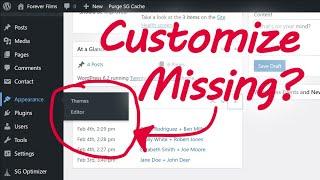
How to Add Custom CSS to WordPress Twenty Twenty-Three Theme (When Customize Menu is Missing)
Added 44 Views / 0 LikesAnnoyed that the WordPress Customize menu is gone when you have a block theme installed? Let's bring it back so you can add custom CSS code. The best way to support or say "thanks" is to start your website idea! If you use my affiliate links, I get a small cut (no extra cost to you) that helps me create free tutorials like this. 🌎 How to Install WordPress in Minutes 👉 https://websiteprofitcourse.com/hosting/ ✅ Start now with HostGator 👉 https://websit
-
Popular

Build a SWEET agency WordPress site under 30 minutes!!! Twenty Twenty theme + 3 Plugins
Added 116 Views / 0 LikesHow to build a marketing agency or web design business website using WordPress, the Twenty Twenty default theme, Jetpack, and Gravity forms. I'll walk you through setting up you homepage, services page, testimonial blocks, and lead capture forms -- in roughly 30 minutes. Hope this video opens up some ideas for you and shows you what you can do with default WordPress + Gutenberg and just a few plugins. Twenty Twenty theme https://wordpress.org/themes/t
-
Twenty Twenty One WordPress theme EARLY PREVIEW...Discussion.
Added 75 Views / 0 LikesRead the original post here: https://make.wordpress.org/core/2020/09/23/introducing-twenty-twenty-one/ I'd love your thoughts on the future of default themes versus the excitement of new features and a true "canvas" for WordPress. Learn more: https://plugintut.com Subscribe! https://plugintut.com/subscribe Follow us! http://twitter.com/plugintut Like us! http://facebook.com/plugintut









