Wordpress
-
01:06 Popular

How to Embed PDF, Spreadsheet, and others in WordPress Blog Posts
Added 127 Views / 0 LikesPDFs, Word Documents, and Excel spreadsheets are great ways to show information on your site and in general. Normally there are no ways to embed these easily with the base WordPress tools. In this video, we will show you how to embed a pdf spreadsheet and others in WordPress blog posts. If you liked this video, then please Like and consider subscribing to our channel for more WordPress videos. Text version of this tutorial: http://www.wpbeginner.com/p
-
05:57

How to Embed TikTok Videos in WordPress
Added 95 Views / 0 LikesDo you want to embed TikTok videos on your WordPress website? WordPress has added some built-in embed options for your posts and pages. In this video, we'll show you how to easily embed TikTok videos in WordPress and show your recent TikTok videos automatically. This video is sponsored by Smash Balloon, a powerful plugin to help you optimize your site for search engines, take a look at Smash Balloon here: ================================= https://smas
-
04:01 Popular

How to Embed Twitter Moments & Tweets in WordPress
Added 126 Views / 0 LikesWe've been able to embed Twitter tweets (individually) in WordPress for a while now, but WordPress 4.5 makes it just as easy to embed Twitter Moments & Timelines. WordPress Twitter embeds are now easier than ever. For individual tweets, nothing has changed: 1. Locate the tweet you'd like to embed in WordPress 2. Click on the date, which will pull up the single tweet by itself 3. Copy the URL of the individual tweet 4. Paste the URL in the WordPress WY
-
09:57

How to Embed Videos in WordPress Blog Posts (FAST and EASY)
Added 68 Views / 0 LikesDo you want to embed videos in your WordPress blog posts? Videos bring life to your website, and they are a great way to increase user engagement. WordPress makes it super easy to embed videos from video hosting sites like YouTube, Vimeo, Facebook, Twitter, and many others. In this video, we will show you how to easily embed videos in WordPress blog posts, pages, and sidebar widgets. 0:00 Intro 0:10 Auto embed videos 2:37 Using a widget to embed 3:15
-
01:45 Popular

How to Embed Your Twitch Stream on WordPress
Added 121 Views / 0 LikesIn today’s video, we're going to learn how to embed your Twitch stream onto your WordPress website. Blog post: https://www.elegantthemes.com/blog/tips-tricks/how-to-embed-your-twitch-stream-on-wordpress Like us on Facebook: https://www.facebook.com/elegantthemes/
-
09:40 Popular
How to Emphasize Your Image's Colors Using Patterns (Download 7 Free Patterns!)
Added 117 Views / 0 LikesWhen you're including images on your website, you want them to draw attention at first sight. One of the things that can bring your image to life is using patterns that emphasize the colors that are being used within the image itself. Not only will it emphasize your image's colors, it will also take your design up a notch. In the blog post, you'll be able to download 7 different patterns for free and use them on any of your designs without restriction
-
08:59

How to Emphasize Your Sticky Button in a Gorgeous CTA Section with Divi
Added 59 Views / 0 LikesWhen the Divi sticky options feature was released, the release post on our blog was accompanied by live demos that show you the versatility of this new feature. To help you understand sticky options better, and start using them in your design, we’ll show you how to recreate one of the live demo designs in this tutorial. The design we’re recreating focuses on emphasizing your sticky button. It’s is a text-based CTA section that allows you to highlight
-
02:19

How to Enable GZIP on WordPress
Added 72 Views / 0 LikesIn today's video, we'll learn how to enable GZIP on your WordPress website. Blog post: https://www.elegantthemes.com/blog/wordpress/how-to-enable-gzip-on-wordpress •️ Learn more about Divi: https://www.elegantthemes.com/gallery/divi • Like us on Facebook: https://www.facebook.com/elegantthemes/ #GZIP #WordPress #ElegantThemes
-
05:14 Popular
How to Enable Maintenance Mode for WooCommerce
Added 128 Views / 0 LikesWe've had users ask us if it's possible to put only their WooCommerce store in maintenance mode without affecting the rest of their site. We've found a way to do this and did our best to simplify the process. In this video, we will show you how to enable maintenance mode for WooCommerce. This video brought to you by SeedProd, the best WordPress giveaway plugin available, take a look at their site here: ================================= https://www.see
-
00:53

How to Enable SVG Uploading in Elementor ️ #Shorts
Added 44 Views / 0 LikesIn this short tutorial, Shiri teaches us how we can enable and upload SVGs in Elementor. 🔔 Subscribe to our channel!🔔 https://www.youtube.com/c/Elementor?sub_confirmation=1 Get Elementor: https://elementor.com Get Elementor Pro: https://elementor.com/pro For more tutorials on this topic: https://elementor.com/academy/ #shorts #elementor #elementorpro #SVG
-
00:59 Popular

How to Enforce Clean Image Filenames in WordPress
Added 115 Views / 0 LikesSearch engines prefer your images to have clean file names. File names with uncommon characters can break images in some browsers. In this video, we will show you how to enforce clean image file names in WordPress. If you liked this video, then please Like and consider subscribing to our channel for more WordPress videos. Text version of this tutorial: http://www.wpbeginner.com/plugins/how-to-enforce-clean-image-filenames-in-wordpress/ Check us out on
-
00:52

How to Enforce One Category Per Post in WordPress
Added 98 Views / 0 LikesWhen adding categories to posts we would recommend only using one category per post. This can be difficult for beginner to get used to. In this video, we will show you how to enforce one category per post in WordPress. If you liked this video, then please Like and consider subscribing to our channel for more WordPress videos. Text version of this tutorial: http://www.wpbeginner.com/plugins/how-to-enforce-one-category-per-post-in-wordpress/ Check us ou
-
01:10 Popular

How to Engage Readers with Post Reactions in WordPress
Added 141 Views / 0 LikesShowing user engagement on your site can sometimes be difficult if there are no comments. There is a way to make it easier for your visitors to show their reactions. In this video, we will show you how to engage readers with post reactions in WordPress. If you liked this video, then please Like and consider subscribing to our channel for more WordPress videos. Text version of this tutorial: http://www.wpbeginner.com/plugins/how-to-engage-readers-with-
-
00:48 Popular

How to Exclude Specific Pages, Authors, and More from WordPress Search
Added 134 Views / 0 LikesExcluding select results from WordPress searches can be useful for stopping your search from showing what it shouldn't. There is a plugin to make this process simple for you. In this video, we will show you how to exclude specific pages, authors, and more from WordPress search. If you liked this video, then please Like and consider subscribing to our channel for more WordPress videos. Text version of this tutorial: http://www.wpbeginner.com/plugins/ho
-
01:25 Popular

How to Expire Posts or Partial Post Content in WordPress
Added 101 Views / 0 LikesHave you wanted to set an expiration date for your posts or have some time specific content? WordPress currently does not have an automated way to expire posts but you can add this to your site. In this video, we will show you how to expire posts or partial post content in WordPress. If you liked this video, then please Like and consider subscribing to our channel for more WordPress videos. Text version of this tutorial: http://www.wpbeginner.com/plug
-
04:38 Popular

How to Expire WordPress Posts after a Specific Date
Added 131 Views / 0 LikesThere are always times when you are running a time sensitive deal on your site that you want to expire. Often those posts live in a category like News or Contests, but there are times when you don't want that. What if there was a way to get rid of the post entirely? In this video, we will show you how to expire posts after specific date in WordPress. If you liked this video, then please Like and consider subscribing to our channel for more WordPress v
-
00:59

How to Export & Import Website Designs With Elementor #Shorts
Added 75 Views / 0 Likes👋🏼 Help us improve by answering this short survey: http://elemn.to/survey-time In this short video, we’ll cover how to export and import a full website using Elementor’s Export/Import tools! 🔔 Subscribe to our channel!🔔 https://www.youtube.com/c/Elementor?sub_confirmation=1 Get Elementor: https://elementor.com Get Elementor Pro: https://elementor.com/pro For more tutorials: https://elementor.com/academy/ See Also: Import & Export Elementor Websites ht
-
05:59

How to Export a Divi Page Layout that Has Custom Code
Added 94 Views / 0 LikesI love being able to export and import a Divi Page Layout. In just a few clicks, I can have all the design elements in one conveniently packaged json file that can be stored for another project. But what if your page layout depends on custom external code (CSS or Javascript)? Of course, you will want to include that code within your page layout export in order to keep the style and functionality of the page elements in place. In this tutorial, I’m goi
-
01:38 Popular
How To Export And Import Opt In With Bloom
Added 147 Views / 0 Likeshttp://www.elegantthemes.com/plugins/bloom/ is the best WordPress Email Opt-In Plugin, created by Elegant Themes. Swing by http://www.elegantthemes.com to download it!
-
15:36 Popular

How to Extend Modules to Create Unique Column Layouts in Divi
Added 169 Views / 0 LikesEvery new page you design with the Divi Builder is structured using a number of different column layouts. Divi includes built-in column layouts for each row ranging from one column all the way to six columns. But, sometimes, you may feel the need to adjust these columns for even more unique layouts. Today, I'm going to show you a creative way to do just that. In this tutorial, I'm going to show you a simple design technique that allows you to extend m
-
1:04:10 Popular
How To Extend WordPress With Custom Post Types & Custom Fields Using PODS
Added 139 Views / 0 LikesWordPress can store and display much more then pages / posts and in this tutorial I will teach you how to create a custom portfolio from scratch using PODS. Links To Everything From The Video: https://pods.io https://www.wpcrafter.com/astra https://www.wpcrafter.com/beaverbuilder https://www.wpcrafter.com/beaver-themer https://www.wpcrafter.com/elementor https://www.wpcrafter.com/ultimate-beaver ~~~~~~~~~~~~~~~~~~~~~ All of my opinions in this video a
-
06:57 Popular

How To Fade Out Text On Divi Post Excerpts
Added 133 Views / 0 LikesI’m a big believer that little things can make a big difference, especially when it comes to building websites. My favorite part of building a site is putting those final touches that seems to bring it all together. It could be a button hover effect, changing the font size of the header in the hero section, or even some padding changes (this sometimes makes a big difference). Whatever the change may be, the important thing to remember is to take the t
-
15:48 Popular

How to Fan Out Images on Scroll to Promote an Image Gallery in Divi
Added 130 Views / 0 LikesKnowing how to fan out images with Divi’s scroll effects can be a subtle and impressive design element to help promote an image gallery on a landing page. The idea is to engage users as they scroll down the page by fanning out images like a hand of playing cards. In this tutorial, we are going to create a clean section layout for promoting an image gallery that includes a collection of images that fan out on scroll. You can use any images you want wit
-
22:15 Popular

How to Fill Text with Images for Creative Backgrounds using Divi
Added 115 Views / 0 LikesIn this tutorial, I’m going to show you how to use the screen blend mode to add colorful image-filled text backgrounds using Divi. I’ll also show you how to add dividers that match the design of your background text and sections that transition smoothly between dividers. Read the full tutorial here: https://www.elegantthemes.com/blog/divi-resources/how-to-fill-text-with-images-for-creative-backgrounds-using-divi
-
00:45

How to Filter Unanswered Comments by Admin in WordPress
Added 80 Views / 0 LikesComments are a great way to build user engagement on your site. To improve engagement you must communicate with your users. In this video, we will show you how to filter unanswered comments by admin in WordPress. If you liked this video, then please Like and consider subscribing to our channel for more WordPress videos. Text version of this tutorial: http://www.wpbeginner.com/plugins/how-to-filter-unanswered-comments-by-admin-in-wordpress/ Check us ou
-
04:17

How to Find a Good Domain Name
Added 78 Views / 0 LikesHow to Find a Good Domain Name In this short video I cover how to find good domains and where you can check if their social media usernames are available. There are tons of great tools out there, and this is just one easy way to search for domain names that are available. I hope this video helped you out. https://leandomainsearch.com/ https://namechk.com/ My Site: https://www.wpwithtom.com/ Best Hosts: SiteGround: https://wpwithtom.com/siteground Gree
-
04:43 Popular

How To Find A Good Domain Name for Your Website
Added 121 Views / 0 LikesCheck the price of your domain here • https://websitelearners.com/get/domaingdn18l 2nd Tool: http://www.bustaname.com/?rid=14434488 Get the best tools for your website • https://websitelearners.com/tools/ How to Make a Website in 10 minutes • https://youtu.be/YWA-xbsJrVg How to make a logo in 5 minutes • https://youtu.be/wVrEeImyg_E By following these steps, you can find a good domain name for your website in just a ‘few minutes’. Steps you need to fo
-
03:44

How to Find a Good WordPress Developer for your Project
Added 84 Views / 0 LikesIn today's video, we'll check out different ways to find a good WordPress developer for your project. Blog post: https://www.elegantthemes.com/blog/wordpress/how-to-find-a-good-wordpress-developer-for-your-project •️ Learn more about Divi: https://www.elegantthemes.com/gallery/divi • Like us on Facebook: https://www.facebook.com/elegantthemes/ #Developer #WordPress #ElegantThemes
-
02:55 Popular
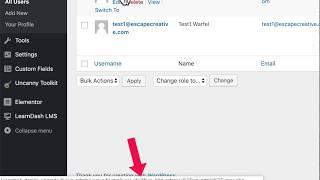
How to Find a WordPress User ID (2 Simple Methods)
Added 151 Views / 0 LikesI'll show you 2 simple ways to find a WordPress User ID. You might need this ID to provide access via a membership plugin, LMS, or for other reasons. By default, the WordPress user ID is not clearly shown on the All Users screen. Here's how you can find it: 1. Navigate to Users → All Users 2. Hover over the username 3. Look in the bottom corner of your browser for a URL 4. In this URL, look for "user_id=X" 5. X is the user ID. It will always be a numb
-
04:00

How to Find and Edit the WordPress User Profile
Added 69 Views / 0 LikesIn today's video, we'll learn how to find and edit the WordPress user profile. Blog post: https://www.elegantthemes.com/blog/wordpress/wordpress-user-profile ➡️ Learn more about Divi: https://www.elegantthemes.com/gallery... 🔵 Like us on Facebook: https://www.facebook.com/elegantthemes/ #Profile #WordPress #ElegantThemes









