Wordpress
-
02:46
Create a Button to Trigger an Onclick Popup in WordPress
Added 100 Views / 0 LikesIn this 'onclick popup' tutorial, we will show you how to add a form to a popup, trigger it with the click of a button, and close upon clicking the "Submit" button of the form, all using Elementor's Popup Builder. Learn More: https://elementor.com/popup-builder/ Get Elementor Pro: https://elementor.com/pro/
-
01:56

How to Add SVG Files to Elementor
Added 100 Views / 0 LikesIn this tutorial, we’ll add SVG files to our WordPress website using Elementor. You'll learn how to: •︎ Add SVG's to the SVG File Library •︎ Change your SVG style properties •︎ And more! Get Elementor: https://elementor.com/ Get Elementor Pro: https://elementor.com/pro/
-
06:05
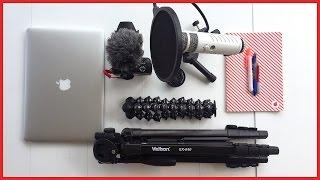
Unser Blog Equipment | Tag #19 || 31 Videos in 31 Tagen
Added 100 Views / 0 LikesHier eine kleine Zusammenfassung unserer Ausrüstung fürs Bloggen und für Videos. Ich hoffe euch gefällt die kleine Auflistung. Welche Tools und welches Equipment nutzt ihr zum Bloggen? Schreibt mir doch einen Kommentar! --- - Kamera: Sony a6300 mit Sony eMount Objektiv 16-70mm - Stativ: https://www.amazon.de/Velbon-EX-640-Video-Dreibein-Stativ-schwarz/dp/B0053CEITO und http://joby.com/gorillapod/gorillapod-focus - Mikrofone: http://de.rode.com/microph
-
05:33

How to Add a Reading Progress Bar in WordPress
Added 100 Views / 0 LikesHow to Add a Reading Progress Bar in WordPress In this video I go over how to add a scroll indicator bar to your WordPress blog posts. Not only will this reading progress bar plugin set up the read meter it also has an option display a helpful box with the estimated reading time of each post. If you're looking for an easy to use vertical scroll progress bar this is the video to watch! I hope you enjoy it! My Site: https://www.wpwithtom.com/ Best Hosts
-
03:01

How to Create a Separate Posts Page in WordPress | Beginners Series
Added 100 Views / 0 Likeshttp://wpwithtom.com/ Elementor: https://bit.ly/2Ct0I1U How to create a separate posts page in WordPress Do you want to know how to create a separate posts page in WordPress? In this video I cover the basics of how doing this starting from scratch. We first go through adding a couple new pages within WordPress. In this tutorial we simply just use a Home and Blog page. After that we add them to the menu as the primary menu and then I show how to set up
-
2:10:43

Programa 2.- #WordPressLive | Licencias GPL, GoogleHacking y WordCamp Madrid
Added 100 Views / 0 LikesPrograma en directo de emisión semanal sobre WordPress. Cada semana, noticias, entrevistas, reportajes, y todo lo relacionado con WordPress... en tu pantalla Esta semana hablamos sobre Google Hacking aplicado a WordPress con Manuel Lemos. Nos explica cómo, utilizando determinadas cadenas de búsqueda en Google, pueden utilizar bugs para acceder a nuestro backend. Por otro lado, entrevistamos a Dani Serrano, que nos hace un resumen de su evolución perso
-
36:43

[En Directo] ¿Necesitas aprender a usar #WordPress?
Added 100 Views / 0 LikesEn esta nueva emisión en directo te hablé sobre las razones por las que debes aprender a usar WordPress, ya que es el futuro. Te hablo sobre las estadísticas de uso de WordPress en el mundo, así como unos ejemplos de ofertas de trabajo de empresas que buscan candidatos con conocimientos de WordPress. Si quieres aprender WordPress desde el principio, a tu ritmo, y con certificado de aprovechamiento, puedes visitar https://academiawp.online Recuerda que
-
06:48

What Are WordPress Themes - And How To Use Them?
Added 100 Views / 0 LikesOne of the many reasons WordPress is so popular is the vast array of different themes you can choose for your site. But what exactly ARE WordPress themes? And how do you use them? For more information about WordPress themes, take a look at: https://winningwp.com/what-are-wordpress-themes/ - Interested in learning even more about #WordPress - with a mind to perhaps even starting your own WordPress-powered website? Check out https://winningwp.com for al
-
09:30

Assistant by Beaver Builder -- A WordPress "management" plugin?
Added 100 Views / 0 LikesDownload here: https://wordpress.org/plugins/assistant/ Today I preview Assistant by Beaver Builder plugin and it's left me quite intrigued for the future of this WordPress "management" plugin. I can't quite put my finger on it, but I did theory craft where this plugin could grow in the WordPress ecosystem. Let me know what you think below. Get Beaver Builder: https://plugintut.com/go/beaverbuilder Learn more: https://plugintut.com Subscribe! https://
-
03:49

WiseStamp Signatures: An Overview and Review
Added 100 Views / 0 LikesIn today’s video, we're going to check out WIseStamp Signatures and see what they can do for you. Blog post: https://www.elegantthemes.com/blog/business/wisestamp-signatures-an-overview-and-review Like us on Facebook: https://www.facebook.com/elegantthemes/
-
06:08

Free Illustrations for Your Website Projects
Added 100 Views / 0 LikesFree Illustrations for Your Website Projects In this video I cover a bunch of free illustration resources that you can use for your WordPress projects. There are a lot of great free illustration options out there these days that include free png and free svg illustration files. I hope this video helps you find icon illustrations for your next web design project! 1) https://undraw.co/illustrations 2) https://www.manypixels.co/ 3) https://iconscout.com/
-
03:02

WordPress Comments [Series]
Added 100 Views / 0 LikesIn this short WordPress comments video I cover how to delete WordPress comments, how to enable WordPress comments, and how to approve WordPress comments. I also show how to enable or disable comments on specific posts. I hope you're enjoying this WordPress dashboard tutorial for beginners series, and hope to see you in the next video! My Website: http://wpwithtom.com/ Best Hosts: SiteGround: https://wpwithtom.com/siteground GreenGeeks: https://wpwitht
-
04:41
How to Serve WebP Images instead of JPG or PNG with WordPress
Added 100 Views / 0 LikesIn today’s video, we're going to learn how to serve WebP images instead of JPG or PNG with WordPress using the Optimole plugin. Blog post: https://www.elegantthemes.com/blog/wordpress/how-to-serve-webp-images-instead-of-jpg-or-png-with-wordpress Like us on Facebook: https://www.facebook.com/elegantthemes/
-
59:16

The Weekly WP Roundup with B.J. Keeton (January 17, 2020)
Added 100 Views / 0 LikesMultistreaming with https://restream.io/ Every Friday afternoon, we go live with a roundup of WordPress news, tutorials, and resources for you. All links we discuss are in the description of this video. We also invite conversation and questions, so make sure to check out the live chat and say hi. --NEWS New Divi Position Options (Draggable Anchors, Fixed Headers, Floating Elements) https://www.elegantthemes.com/blog/theme-releases/including-fixed-head
-
08:30

How to Create an Online Order Form in WordPress
Added 100 Views / 0 LikesWe've been asked how to create an online order form so customers can place orders on their website. If you have a restaurant or a physical store you may not want to create a whole online shop. However, you may still want to offer a simple method to send in offers an easy way for your customers to order from you. In this guide, we'll show you how to easily create an online order form on your WordPress website. This video brought to you by WPForms, the
-
35:48
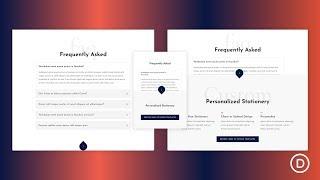
How to Design a Floating Footer Drawer in Divi
Added 100 Views / 0 LikesHey Divi Nation, welcome to a brand new Divi Use Case live stream where each week we show you how to add new design and functionality to your Divi website. Footer drawers are containers of web content (like a Divi section) that can be toggled open and closed by the click of a button or on hover. It is like having a little hiding place for premium content. In this live tutorial, we are going to design a floating footer drawer in Divi. With the process
-
09:21

Setting up an Advanced WooCommerce Checkout Page using Neve and Neve Pro
Added 100 Views / 0 LikesHey guys! How are you all doing? Today we're going to take a look at how we can set up an advanced checkout page using Neve and Neve Pro. Hope this will be helpful! Have a great one! • Website → https://themeisle.com WordPress Articles → https://themeisle.com/blog/ Facebook → https://www.facebook.com/themeisle/ ThemeIsle is the go-to source for the High-Quality WordPress Themes (both free & premium), and plugins every website owner needs. We're passio
-
06:32

8 Best WordPress Notification Bar Plugins Compared
Added 100 Views / 0 LikesAre you wanting to add a notification bar to your site? A floating bar or a "hello bar" can be a great way to let users know about a sale or coupon on your site. When done poorly this can be annoying which is why we're creating this list. In this video, Syed and Christina will cover the best WordPress notification bar plugins to boost traffic, get more subscribers and increase sales. This video brought to you by RafflePress, the best WordPress giveawa
-
07:47

Fiverr Review - Pros and Cons of the Platform
Added 100 Views / 0 LikesFiverr Review - Pros and Cons of the Platform Fiverr: https://www.wpwithtom.com/fiverr Fiverr Gigs I Recommend: Logos: https://www.wpwithtom.com/logo-design Voice Over: https://www.wpwithtom.com/voiceover SEO Linkbuilding: https://www.wpwithtom.com/linkbuilding WordPress help: https://www.wpwithtom.com/wp-fixes In this video I do a full Fiverr review where I cover some of the pros and cons for both buyers and sellers on the platform. I've been using F
-
12:05

How to Design an Animated Clock with Divi’s Scroll Effects
Added 100 Views / 0 LikesThe web is full of sites that need design accents related to time (speed optimization, upcoming events, etc.). In most cases, a clock icon or graphic can work great. But, creating an animated clock design will definitely give a unique “spin” to the design of your website. With all of the built-in design options available in Divi, we can create an awesome animated clock design from scratch. In this tutorial, we are going to create an animated clock tha
-
02:29

The Divi Black Friday Sale Is Coming!
Added 100 Views / 0 LikesAccess The Sale: https://www.elegantthemes.com/black-friday-2020/ Win A Free iMac: https://www.elegantthemes.com/black-friday-2020/#giveaway Get ready because the Divi Black Friday sale is coming on November 27th, and just like every year before it, we are going all out to make this the most amazing sale of all time. I’m talking about gigantic discounts, free prizes, exclusive perks, exclusive bonus gifts and more, and there will be plenty to be excit
-
35:32

Divi Feature Update Live - Full Site Front-End Editing For Divi
Added 100 Views / 0 LikesPowered by Restream https://restream.io/ We are excited to release Full Site Front-End Editing for Divi. This update allows you to easily jump into your custom headers, footers and post templates while browsing your website and edit them in the Visual Builder. There’s no longer a need to navigate through the WordPress Dashboard or the Divi Theme Builder to edit parts of your website. When you enable the Visual Builder, you can edit everything you see,
-
07:49

How to Balance the Primary & Secondary Buttons in Your Divi Fullwidth Header Module
Added 100 Views / 0 LikesPrimary buttons and secondary buttons help guide your website visitors towards certain actions. Primary buttons are typically the most common or desired action and secondary buttons are a less common action. This helps guide visitors to where they want to go. To accomplish this, primary buttons should stand out visually and secondary buttons should not stand out as much. That means primary buttons should be more distinctive and have more visual weight
-
14:01

How to Embed an Instagram Feed on a WordPress Website (2023)
Added 100 Views / 0 LikesLooking for the most cost effective WordPress web hosting, check out Hostinger: https://wpventure.com/hostinger - Coupon Code: WPVENTURE For the best premium WordPress web hosting, check out WP Engine: https://wpventure.com/wpengine In this video we’ll show you a simple step-by-step guide on how to quickly embed an Instagram Feed on your website with nearly any page builder using Smash Balloon’s Instagram Feed Plugin. You can customize the layout, col
-
16:37
WordPress Multisite - Install Your WordPress Multiste Network In Under 20 Minutes
Added 99 Views / 0 LikesGrab Your Free 17-Point WordPress Pre-Launch PDF Checklist: http://vid.io/xqRL WordPress Multisite - Install Your WordPress Multiste Network In Under 20 Minutes https://youtu.be/CpFGRCj2R9g Grab your free 17-Point WordPress Pre-Launch PDF Checklist: http://vid.io/xqRL WordPress multisite is the same software that WordPress.com is built on. It allows you to create as many different WordPress sites as you want from a single database. Some fun facts: - W
-
01:04

How to Add a Milestone Countdown Widget in WordPress
Added 99 Views / 0 LikesHave you ever needed to count down to a milestone on your site? Maybe a birthday or a wedding? In this video, we will show you how to add a milestone countdown widget in WordPress. If you liked this video, then please Like and consider subscribing to our channel for more WordPress videos. Text version of this tutorial: http://www.wpbeginner.com/plugins/how-to-add-a-milestone-countdown-widget-in-wordpress/ Follow us on Twitter: http://twitter.com/wpbeg
-
01:02

How to Add New Default Avatars in WordPress
Added 99 Views / 0 LikesFor branding or to look professional some users want to change the default gravitar for their site. The previous method required diving into the code but luckily there is a way with a plugin. In this video, we will show you how to add new default avatars in WordPress. If you liked this video, then please Like and consider subscribing to our channel for more WordPress videos. Text version of this tutorial: http://www.wpbeginner.com/plugins/how-to-add-n
-
01:04

How to Add Custom After Post Widgets in WordPress
Added 99 Views / 0 LikesHave you wanted to add something to the end of your posts such as a subscribe box or button? There is a plugin to help make this simple. In this video, we will show you how to add custom after post widgets in WordPress. If you liked this video, then please Like and consider subscribing to our channel for more WordPress videos. Text version of this tutorial: http://www.wpbeginner.com/plugins/how-to-add-custom-after-post-widgets-in-wordpress/ Check us o
-
04:19

How to Hide a WordPress Page From Google
Added 99 Views / 0 LikesSometimes you may want to hide a page from search engines to keep away unwanted users or to protect your privacy. We understand how important this can be and we want to show you how you can hide pages from search engines on your site. In this video we will show you how to hide a WordPress page from Google without affecting your site's SEO. Text version of this tutorial: http://www.wpbeginner.com/wp-tutorials/how-to-hide-a-wordpress-page-from-google/ I
-
07:57
WordPress 101 - Adding & Setting Up Widgets
Added 99 Views / 0 LikesLearn how to set up widgets on your WordPress website. Useful WordPress Themes Links: WordPress Blog Themes - https://mythemeshop.com/theme-category/wordpress-blog-themes/ WordPress Business Themes - https://mythemeshop.com/theme-category/wordpress-business-themes/ WordPress eCommerce Themes - https://mythemeshop.com/theme-category/wordpress-ecommerce-themes/ Free WordPress Themes - https://mythemeshop.com/theme-category/free-wordpress-themes/ Magazin









