Wordpress
-
05:20 Popular

How to deactivate the WordPress Gutenberg Editor
Added 123 Views / 0 LikesYou want to use the latest Wordpress 5+ version, but are not ready for the new Gutenberg editor? Don't worry, you can just install the "Classic Editor" plugin, switch back to the classic editor this way and deactivate Gutenberg. You can even choose to use the Gutenberg editor just at some times (e.g. for your posts but not for your pages). The Classic editor plugin will be officially supported until Dec 31, 2021. --- Links from the video: Classic edit
-
07:02 Popular

Cómo Crear fácilmente un plugin de funciones en WordPress | WordPress Para Novatos
Added 123 Views / 0 LikesA veces te ves en la necesidad de agregar código php al archivo functios.php de tu instalación de WordPress para conseguir realizar determinadas funciones que tu theme no trae por defecto. Sin embargo esto no siempre es una tarea fácil porque tienes que tener unos mínimos conocimientos de programación en php y debes tener en cuenta también que el día que decidas cambiar de theme, también cambiará el archivo functions.php de tu servidor, por lo que per
-
03:03 Popular

What is Wix? A Simple Explanation...
Added 123 Views / 0 LikesWix is a pretty common name in website building these days, but what is Wix? We'll go over the fundamentals and give a quick demo... - Interested in learning about WordPress? Check out https://winningwp.com for all kinds of tips, tricks, beginner guides, deals and resources! - Guide to Choosing the Best WordPress Hosting: https://winningwp.com/best-wordpress-hosting/ - Beginner WordPress Guides: https://winningwp.com/guides/ - Exclusive WordPress Deal
-
10:18 Popular
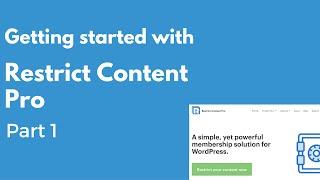
Restrict Content Pro WordPress plugin - Getting Started #1
Added 123 Views / 0 LikesFor more hand-crafted WordPress tutorials visit: http://plugintut.com Restrict Content Pro is a membership WordPress plugin for restricting content, building membership websites, and selling online courses. Check it out at: https://restrictcontentpro.com/?ref=4562 Tune into our podcast! http://pluggedinradio.com Follow us on Twitter! http://twitter.com/plugintut Like us on Facebook! http://facebook.com/plugintut
-
34:49 Popular

FacetWP WordPress plugin w/ Matt Gibs - PluggedIn Radio Episode #2
Added 123 Views / 0 Likeshttps://plugintut.com/facetwp-interview/ FacetWP filtering plugin for WordPress. In this interview we meet the creator Matt Gibbs and he walks us through setting up and using FacetWP filtering. Your home for hand crafted WordPress plugin tutorials & interviews! Check out more WordPress tutorial and podcast episodes at http://plugintut.com
-
11:54 Popular

Patreon Alternatives on WordPress - GiveWP & WP Simple Pay plugins
Added 123 Views / 0 LikesMany YouTube creators are looking for Patreon alternatives given the recent news of their pricing change. Obviously, I'm a huge WordPress fan and I believe in owning your own content/platform that helps earn you money. Today, I'll show you two plugins that I think can help you get a basic donation form set up on your own WordPress website in place of the Patreon platform. https://givewp.com & https://wpsimplepay.com/ Also check out Beaver Builder Page
-
1:57:56 Popular

Wordpress Website Erstellen - Anfänger Tutorial | (Deutsch/German)
Added 123 Views / 0 LikesWie du eine Wordpress Website ohne jegliche Vorkenntnisse und ohne zu programmieren erstellen kannst, erfährst du in dieser Anleitung. • Zum Begleitartikel : https://webseitenmachen.de/start/ Timestamps : 1.) Was ist Wordpress? - 00:01:25 2.) Domain & Hosting besorgen – 00:04:03 3.) SSL Zertifikat - 00:15:06 4.) Wordpress Installieren - 00:20:24 5.) Wordpress Basics Tutorial- 00:22:47 6.) Homepage einrichten - 00:26:17 7.) Theme installieren - 00:28:1
-
12:00 Popular

Easy Front End Login With Two Wordpress Plugins
Added 123 Views / 0 LikesGrab Your Free 17-Point WordPress Pre-Launch PDF Checklist: http://vid.io/xqRL Easy Front End Login With Two Wordpress Plugins https://youtu.be/cp3gc0yaHyg //* Here's the link for Elementor Pro (aff): https://wplearninglab.com/go/elementor040 Get on the Unofficial Ultimate Guide To Elementor course waiting list here (no obligation): https://elementor.convertri.com/elementor-guide-waiting-list Join our private Facebook group today! https://www.facebook
-
09:47 Popular

How to Make a Website in Under 10 Minutes
Added 123 Views / 0 LikesHow to Make a Website in Under 10 Minutes GreenGeeks Hosting: https://wpwithtom.com/greengeeks Elementor Builder: https://wpwithtom.com/elementor Astra Theme: https://wpwithtom.com/astra In this video I show you how to make a website quickly. I go step by step through getting hosting and a domain name through GreenGeeks, followed by covering how to install WordPress, and then we get into how to create a website by using a free theme and free builder.
-
03:37 Popular
7 Best Project Management Plugins for WordPress
Added 123 Views / 0 LikesIn today’s video, we're going to check out the 7 best project management plugins for WordPress. Blog post: https://www.elegantthemes.com/blog/wordpress/best-project-management-plugins-for-wordpress Like us on Facebook: https://www.facebook.com/elegantthemes/
-
08:00 Popular

How To Add A Click To Call Button In Wordpress
Added 123 Views / 0 LikesHow To Add A Click To Call Button In Wordpress https://youtu.be/cZtivv3bVhk //* Tutorial on backing up your WordPress site: https://youtu.be/566Zw8e84lE Join our private Facebook group today! https://www.facebook.com/groups/wplearninglab //* It's not hard to add a Click To Call button in WordPress; in fact, it just takes a free plugin or a simple HTML tag. This video shows you the plugin route because the plugin helps you easily customize your click t
-
06:20 Popular

Best WordPress Themes for Blogs & Small Businesses in 2020
Added 123 Views / 0 LikesIf you think about starting a new website or blog in 2020, and you are looking for the best WordPress theme, check out these themes: 1. Neve - http://bit.ly/NeveWPTheme 2. Hestia - http://bit.ly/HestiaPRO 3. Astra - https://wpastra.com/ 4. OceanWP - https://oceanwp.org/ I think that the best WordPress theme should come with a well-designed collection of pre-built websites that you can easily import and customize to create a blog as well as full websit
-
01:50 Popular

The Divi Cyber Monday Sale Starts Now!
Added 123 Views / 0 LikesAccess The Sale Before It's Gone: https://www.elegantthemes.com/cyber-monday-2019/ Black Friday and Cyber Monday are the only times each year that we offer our biggest discount ever. It only happens once per year, and when the sale is over the discount is gone for a whole year! If you are waiting for the perfect time to join the Divi community or the best time to upgrade your current account to Lifetime, this will be it! You don't want to miss this.
-
09:24 Popular

How to Configure Your WooCommerce Shipping Options
Added 123 Views / 0 LikesIn today’s video, we're going to learn how to configure your WooCommerce shipping options. Blog post: https://www.elegantthemes.com/blog/wordpress/woocommerce-shipping Like us on Facebook: https://www.facebook.com/elegantthemes/
-
03:46 Popular
How to Get Freelance Clients Through Word of Mouth
Added 123 Views / 0 LikesIn today’s video, we're going to learn how to get freelance clients through word of mouth. Blog post: https://www.elegantthemes.com/blog/business/freelance-word-of-mouth Like us on Facebook: https://www.facebook.com/elegantthemes/
-
03:02 Popular

How to Fix the HTTP Error Code 501
Added 123 Views / 0 LikesIn today's video, we'll learn how to fix the HTTP error code 501. Blog post: https://www.elegantthemes.com/blog/wordpress/how-to-fix-the-http-error-code-501 •️ Learn more about Divi: https://www.elegantthemes.com/gallery/divi • Like us on Facebook: https://www.facebook.com/elegantthemes/ #Error501 #WordPress #ElegantThemes
-
10:47 Popular

How to Create a Mobile Collapsing Nested Menu with Divi’s Theme Builder
Added 123 Views / 0 LikesA while back, we shared a mobile menu hack that helps you create a collapsing nested menu. We know many of you have used it, but with the new Divi Theme Builder, the approach becomes slightly different. In today’s tutorial, we’ll show you how to apply a mobile collapsing effect to the Menu Module inside the Divi Theme Builder. There are three main parts to this tutorial: Setting up your menu and assigning the correct classes to your menu items Buildin
-
46:35 Popular

How to Create an Interactive Image Collage Using Divi’s Position Options
Added 123 Views / 0 LikesDivi’s new position options open the door for creating unique image collage layouts using the absolute position property. This allows you to make more precise placements for each element of your design. And once you combine that with the countless combinations of design settings within Divi, you can design some pretty amazing image collages. In this tutorial, I’m going to show you how to use Divi’s built-in position options to create a beautiful inter
-
06:35 Popular

WordPress SMTP Plugin for Sending Emails Step by Step by WP Mail
Added 123 Views / 0 LikesBy default, WordPress uses the PHP Mail function to send out emails from your website. However, it is much better to use SMTP as it handles sending messages even better and you can be sure that your emails will go out straight to the inbox folder of your recipients. Hello WordPress enthusiasts and welcome to our channel. My name is Robert and in this video, I am going to show you how to use the WP Mail SMTP by WPForms plugin. Let's go ahead and instal
-
12:18 Popular

How To Make WooCommerce Checkout Like Shopify - Conversion Optimized, Oh And [ FREE ]
Added 123 Views / 0 LikesIn this WooCommerce tutorial, I'll show you how to take your boring and poorly converting WooCommerce checkout page and make it conversion-optimized just like Shopify. As I shared in the video, I have a full WooCommerce tutorial on the way, the link will be added below in a day or two. Also make sure to check out the free Kadence Theme https://www.wpcrafter.com/kadence • WordPress Deals May 2020 • * SiteGround -- https://www.wpcrafter.com/siteground (
-
12:10 Popular
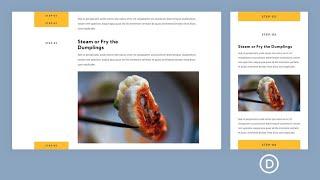
How to Stack Sticky Headings on Scroll for Unique Anchor Link Navigation in Divi
Added 123 Views / 0 LikesDivi’s sticky options continue to open doors for new design and functionality. In this tutorial, we are going to design a creative way to lead users through the content of a webpage using sticky headings as anchor links. The sticky headings stick to the top and bottom of the browser window as a helpful identifier of the content in view as well as the content that resides above or below. By adding anchor links to these sticky headers, we can allow user
-
48:39 Popular

Lemlist Vs. Funnel Bake - Two Entirely Different Systems Explained
Added 122 Views / 0 LikesIn this livestream I will be talking about Lemlist vs. Funnel Bake. Link https://www.wpcrafter.com/lemlist ~~~~~~~~~~~~~~~~~~~~~ All of my opinions in this video are my own, I was not paid to make this video. Whenever there is a link in any of my videos, if there is an affiliate program available, it's safe to assume that you are clicking on an affiliate link. Please check my website for any associated bonus I may be offering, for supporting me, or as
-
11:17 Popular

Best Backup Plugins For WordPress After 10 Years Of Making & Supporting Websites
Added 122 Views / 0 LikesThere is nothing more important than having a reliable backup that you know how to restore. you can't rely on your web host or web developer. You have to make sure this is in place. Nothing is worse than when trouble comes and you don't have a reliable backup. So here are my top picks after having used WordPress for the past 10 years. Updrafts Tutorial: https://www.youtube.com/watch?v=jXb512M_WSY WP Time Capsule Video: https://www.youtube.com/watch?v=
-
22:16 Popular

Elementor Unofficial Year In Review & What Coming In 2018 + (CONTEST)
Added 122 Views / 0 LikesHere is the unofficial Elementor Pro year in review, how far it has come, and what to expect in the next 12 month. Plus a chance to win a license of Elementor on me... Elementor: https://www.wpcrafter.com/elementor Remeber, to enter the Elementor Pro contest, upload your video to Twitter and tag @wpcrafter AND @elemntor Thanks for watching.
-
10:53 Popular

How To Add A Read Meter To Your Blog Website To Keep Readers Glued To Your Content
Added 122 Views / 0 LikesIn this WordPress tutorial, I am going to show you how to add a read meter to your website that will keep your readers glued to your content. The best part is, I am using a completely free plugin named, you guessed it, read meter. reading progress bar wordpress dynamic progress bar wordpress animated progress bar wordpress plugin reading progress bar divi vertical scroll progress bar scroll progress bar wordpress blog progress bar wordpress admin prog
-
06:10 Popular

100K Subscribers! Thank You And Something Bigger Is Coming...
Added 122 Views / 0 LikesSomething big just happened and something even bigger is coming. For a YouTube channel to hit 100k subscribers is a huge milestone. But I have something even bigger planned... ~~~~~~~~~~~~~~~~~~~~~ All of my opinions in this video are my own, I was not paid to make this video. Whenever there is a link in any of my videos, if there is an affiliate program available, it's safe to assume that you are clicking on an affiliate link. Please check my website
-
03:28 Popular

How to Change YouTube Playback Speed (Slow Motion, 2x, etc.)
Added 122 Views / 0 LikesThis video will show you how to quickly change the YouTube playback speed to 0.25, 0.5, 1.25, 1.5 or 2x. For slow motion YouTube videos, choose a playback speed of 0.25 or 0.5. For tutorials, educational videos, lectures, etc., increase your playback speed to 1.25x, 1.5x or 2x. YouTube playback speed is only available on the YouTube web player, and NOT for YouTube's mobile apps on Android & iPhone. HOWEVER, you can open YouTube videos on their mobile
-
01:51 Popular

Facebook Like Button: How To Add Like Button To Wordpress (Rapid Fire)
Added 122 Views / 0 LikesDownload our exclusive 10-Point WP Hardening Checklist: http://bit.ly/10point-wordpress-hardening-checklist Facebook Like Button: How To Add Like Button To Wordpress (Rapid Fire) This is the easiest way to get Facebook on your website. To install the Facebook Like button on your site all you need is a Facebook developers account (which is free) and then grab the code on this page: https://developers.facebook.com/docs/plugins/like-button You can custom
-
03:31 Popular
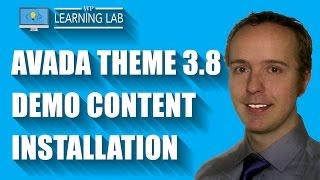
WordPress Avada Theme 3.8+ Demo Content: What Is It & How To Use It (Avada Theme) | WP Learning Lab
Added 122 Views / 0 LikesGrab Your Free 17-Point WordPress Pre-Launch PDF Checklist: http://vid.io/xqRL Download our exclusive 10-Point WP Hardening Checklist: http://bit.ly/10point-wordpress-hardening-checklist WordPress Avada Theme 3.8+ Demo Content: What Is It & How To Use It (Avada Theme) | WP Learning Lab How to install a premium theme from ThemeForest.net: https://youtu.be/5gwRfw2YjIg In this tutorial walkthrough I'm going to show you how to install Avada theme demo con
-
06:49 Popular

Remove "Proudly powered by WordPress" from the footer | WP Learning Lab
Added 122 Views / 0 LikesGrab Your Free 17-Point WordPress Pre-Launch PDF Checklist: http://vid.io/xqRL Download our exclusive 10-Point WP Hardening Checklist: http://bit.ly/10point-wordpress-hardening-checklist Remove "Proudly powered by WordPress" from the footer | WP Learning Lab Many free WordPress themes, and some paid ones, have a "Proudly Powered by WordPress" message in the footer. Although, there is nothing wrong with message, for the sake of branding many site owner









