Wordpress
-
29:17 Popular

How to Create an Elegant Wedding Website with Divi (Part 2)
Added 111 Views / 0 LikesThis second part is going to be dedicated to creating a gallery page within your wedding website. The gallery page is in the same style as the wedding announcement page, which allows you to use both on the same website without having to make a lot of changes. We’ll show you step by step how to create the following layout with the visual builder of Divi. Read more: https://www.elegantthemes.com/blog/divi-resources/how-to-create-a-wedding-gallery-page-w
-
05:13 Popular
Download a Stylish Fashion Layout Pack for Divi
Added 111 Views / 0 LikesThis week our design team breaks into the world of fashion with a fashion layout pack designed to be as flexible as it is stylish. With the eight different page layouts included in the pack, the website is going to look great right out of the box. And, the site isn't limited to the fashion niche. With a few customizations, you can build many different kinds of websites including blogs, small business sites, and even e-commerce sites. To use the Fashio
-
12:23 Popular

The Divi Fullwidth Portfolio Module
Added 111 Views / 0 LikesThe Fullwidth Portfolio module works just like the normal Portfolio module, except that it displays your project in a beautiful Fullwdth fashion. It also comes with some unique new layouts: Grid & Carousel. The module works by displays a list of your most recent Projects, and can be used by designers and artists that want to display a gallery of their most recent work. View full documentation here: https://www.elegantthemes.com/documentation/divi/full
-
26:59 Popular

Using the Divi Role Editor
Added 111 Views / 0 LikesThe Divi Role Editor gives you control over what each different WordPress User Role can do within the Divi Builder. For each role, you can disable certain actions within the Divi Builder, which will limit how the builder can be used for users of that role. This is the perfect way for WordPress freelancers and smaller web design agencies to hand off websites to their clients, while at the same time limiting what the client can do within Divi. By limiti
-
12:19 Popular

Using Selective Sync In Divi
Added 111 Views / 0 LikesSelective Sync allows you to save individual settings when saving a new global library item. You can choose to selectively sync any or all of the Content, Design, or Advanced tabs. For example, if you save a new module to the library as a global item, you can edit the settings to only sync the Design Settings, then only these settings will be added to the library. This is especially useful if you are delving into the Design or Advanced Tabs, and would
-
11:46 Popular

Using Divi’s Right Click Controls
Added 111 Views / 0 LikesWhenever you right click on something with the Divi Builder or Visual Builder enabled, whether it be a Module, Row or Section, you will get a list of different actions that can be performed. These actions include: Undo, Redo, Save to Library, Disable, Lock, and Copy & Paste. You may be familiar with many of these functions already as they’re fairly common. Which is why we’ve added them to the Right Click controls for your convenience! This way you don
-
02:26 Popular

Divi Feature Update! Introducing The Innovative Divi Help System
Added 111 Views / 0 LikesLearn more here: https://www.elegantthemes.com/blog/theme-releases/divi-helper Today we are excited to release the Divi Help System including over 70 full length instructional videos organized and accessible right inside the Divi Builder. This unique system gives you and your clients the help you need when and where you need it, allowing you to learn and follow along with our documentation team while you build your website without ever leaving the bui
-
19:51 Popular

How to Creatively Highlight Your Membership Deals with Divi
Added 111 Views / 0 LikesIf you’re offering membership deals on your website, it’s important to make sure people will notice them on your website. To give you a headstart, we’re going to provide you with a stunning membership showcase that you can recreate step by step using Divi’s built-in options only. We’re combining a beautiful section background with Blurb Modules that showcase membership deals and a separate button that takes your visitors to the right page. Read the po
-
54:44 Popular

The Weekly WP Roundup with B.J. Keeton (August 17, 2018)
Added 111 Views / 0 LikesIt’s Friday, and I’m B.J.I We’re gonna talk about the best News, Tutorials, and Resources that were published over the past week. Feel free to ask any questions you may have in the comments, or just say hi. Elegant Themes Blog Open Submissions https://www.elegantthemes.com/blog/community/elegant-themes-blog-submissions --NEWS Name Change! TWIW is dead. Long live The WP Weekly Roundup Divi Feature Update (Initial Gutenberg Support Overview and Examples
-
03:58 Popular
Get a FREE Therapist Layout Pack for Divi
Added 111 Views / 0 LikesHey Divi Nation! Thanks for joining us for the next installment of our weekly Divi Design Initiative; where each week, we give away two brand new, free Divi Layout Packs from our design team to you. For the first layout this week, Kenny and his team have created a brand new Therapist Layout Pack. This Layout Pack is built to offer a beautiful and comforting web presence for any therapist or therapy company. The design is clean a calm. And, with all th
-
1:00:29 Popular

The Weekly WP Roundup with B.J. Keeton (January 18, 2019)
Added 111 Views / 0 LikesMultistreaming with https://restream.io/ Every Friday afternoon, we bring you the best news, tutorials, and resources about WordPress we can find around the internet. All links are in the video description, and feel free to join the conversation in the live chat or comments about what WP has done for you this week. --NEWS Announcing Newspack by WordPress.com — A New Publishing Solution for News Organizations https://en.blog.wordpress.com/2019/01/14/ne
-
17:57 Popular
How to Get Creative with Divi’s 6 Column Row & Viewport Units
Added 111 Views / 0 LikesThe variety of Divi’s column structures allow you to create basically any design you have in mind. And although using the column structures in their original form is the most straightforward thing to do, you can also take it one step further by combining the design elements in a 6-column row with viewport units. One of the things you could create, for example, is a collage. You won’t have to use any image editing software at all! On top of that, you c
-
03:29 Popular

How to Create a Product Buying Guide for Your Business
Added 111 Views / 0 LikesIn today’s video, we cover how to create a product buying guide for your business. Blog post: https://www.elegantthemes.com/blog/marketing/how-to-create-a-product-buying-guide-for-your-business-and-why-youd-want-to All articles and links mentioned in the video can be found in the blog post linked above. Like us on Facebook: https://www.facebook.com/elegantthemes/
-
02:40 Popular

Meet Media Carousel: Create Image & Video Carousels and Sliders in WordPress
Added 111 Views / 0 LikesWe are excited to introduce a powerful and visual widget for showcasing your images and videos: The Media Carousel Widget. Get Media Carousel: https://elementor.com/pro/ The Media Carousel widget will take your images and videos to the next level of design. This widget comes with 3 skins to choose from: Carousel, for displaying several slides for each view, Slideshow, showing a primary slide and small image thumbnails underneath, and Coverflow, showin
-
03:13 Popular
How to Design the Archive Template in WordPress
Added 111 Views / 0 LikesThe Archive Template in Elementor Theme Builder lets you create WordPress archive pages, including main blog pages, visually and without code. The content is created dynamically, using Elementor's Dynamic Content feature. Get Elementor Theme Builder: https://elementor.com/theme-builder/
-
1:35:21 Popular

How to Make a WordPress Website 2019
Added 111 Views / 0 LikesHow to make a WordPress website 2019 - WordPress tutorial for beginners. Learn step by step how to create a $3,000+ website using WordPress. Follow along here: https://ohklyn.com/how-to-make-a-wordpress-website-2018-2019/ Bluehost discount: https://ohklyn.com/go/bluehost-discount/ Divi theme: https://ohklyn.com/go/divi-discount/ In this WordPress tutorial for beginners, we show you how to create an agency level WordPress website step by step, and save
-
20:42 Popular

How To Make A Website With WordPress [IN 15 MINS]
Added 111 Views / 0 LikesHow To Make A Website With WordPress [IN 15 MINS] - Hosting Discount Here • https://createwpsite.com/special-deals/ Have you been thinking of having your own WordPress website or blog and you think it is too difficult or complicated? Are confused on where to start? Are you confused on how do things like registering domain name, web hosting and WordPress installation? Making a WordPress is not really difficult, it is as easy as any other thing that you
-
13:16 Popular

Mega Menus - How to Create Mega Menus in WordPress
Added 111 Views / 0 LikesIn this video you will learn how to create a mega menu for your WordPress website using a powerful plugin called the Mega Menu plugin by Woo Rockets. Get your FREE WordPress SEO Course from the Web Monkey Academy - https://thewebmonkeyacademy.com/ Get 2 months FREE access to more than 16,000 courses on SkillShare - https://www.skillshare.com/r/profile/Alexander-Oni/6660110 Follow me on Facebook - https://www.facebook.com/thewebmonkeyonline/ Visit my b
-
1:00:04 Popular

WordPress Theme Auswahl 2019 so einfach wie ein Homepagebaukasten mit dem Call a Nerd Theme
Added 111 Views / 0 LikesMehr Infos https://callanerd.help/wordpress-theme Hallo und herzlich willkommen zu meiner kostenlosen Lernvideoreihe „Die eigene Webseite mit dem Call a Nerd Wordpress Theme“. Über diesen Link https://goo.gl/gjEFXC in Kombination mit dem Rabattcode: FPAT-ZELT-05 gibt es 10% Rabatt auf fast alle Webhosting-Pakete von Alfahosting. Jetzt zum zweifachen Chip Webhosting Testsieger wechseln. Oder die Webseite direkt bei einem guten Anbieter starten (Affilat
-
17:08 Popular

Beste WooCommerce Plugins Top 10 für Wordpress Onlineshop | Tutorial 2019 deutsch
Added 111 Views / 0 LikesWir haben ein revolutionäres eigenes WordPress und WooCommerce Theme veröffentlicht. Jetzt Video dazu anschauen: https://callanerd.help/wordpress-theme Mehr zu diesem Video auf Ganzes Video und Links zu den Plugins: https://callanerd.help/yt10 In diesem Video geht es um Woocommerce Plugins und wie man seinen Shop besser nutzen kann. Über diesen Link https://goo.gl/gjEFXC geht es zu allen Webhosting-Paketen von Alfahosting. Jetzt zum zweifachen Chip We
-
05:23 Popular
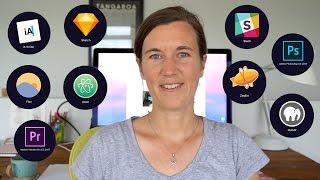
Welche Mac Apps wir nutzen (Design & WordPress Theme Entwicklung) | Tag #11 || 31 Videos in 31 Tagen
Added 111 Views / 0 LikesDa wir immer wieder gefragt werden, welche Software wir für das Webdesign und die Entwicklung unserer WordPress Themes nutzen, hier eine Auflistung der Programme (Mac), die wir täglich nutzen. Design: Sketch, Zeplin Theme Entwicklung: MAMP, Atom, Chrome Bildbearbeitung: Photoshop Videoschnitt: Premiere Pro Screencasts: Camtasia Studio Schreiben: iAWriter Kommunikation: Slack --- Blogbeitrag auf Elmastudio: 10 nützliche Atom Texteditor Erweiterungen fü
-
03:57 Popular

Frohes Neues Jahr 2017! | Tag #1 || 31 Videos in 31 Tagen
Added 111 Views / 0 LikesTag 1 meiner kleinen YouTube Video Challenge. Als kleinen Neujahrsvorsatz plane ich für Januar jeden Tag ein Video hier auf unsern YouTube Kanal hochzuladen. Hier mein erstes Intro :) Happy New Year 2017!!! (die Videos werden meistens auf Deutsch, vielleicht kommen auch ein paar englische Videos dazu (mal schauen). Wenn ihr Fragen habt, die ich in den Videos beantworten soll (zu WordPress, Freelancing, Bloggen, Homeoffice, Auswanderung etc.) sagt mir
-
07:49 Popular

Tipps zur WordPress THEME ANPASSUNG | Tag #28 || 31 Videos in 31 Tagen
Added 111 Views / 0 LikesHeute zeige ich, wie du ganz leicht ein WordPress Theme anpassen kannst (mit eigenem CSS und mit Plugins für die Schrift-Anpassung). Wenn du Fragen zur Anpassung von WordPress Themes hast oder weitere Tipps, sag doch einfach Bescheid. Ich freue mich auf deinen Kommentar! --- Erwähnte WordPress Plugins: eigenes CSS: https://srd.wordpress.org/plugins/jetpack/ https://srd.wordpress.org/plugins/simple-custom-css/ Schriftanpassung: https://wordpress.org/pl
-
05:52 Popular

Poner aviso de política de Cookies en WordPress en 5 minutos | WordPress Para Novatos
Added 111 Views / 0 LikesEste tutorial no es modificable ni ampliable. Si quieres aprender más sobre este u otros plugins, puedes suscribirte a mi Academia de Cursos sobre WordPress en https://wpacademia.es +++++++++ Como sabes, es obligatorio incluir en todos los blogs de la Unión Europea, un aviso donde se informe a tus lectores de que se están guardando unas cookies para realizar distintas mediciones. En este vídeo vas a aprender a insertar un aviso de política de cookies
-
07:44 Popular
Instalación masiva de plugins en WordPress con WP Install Profiles
Added 111 Views / 0 LikesCrea tu propio listado de plugins favoritos e instálalos de una sola vez en tu blog de WordPress. Tan sencillo como entrar en http://plugins.ancillaryfactory.com/ y seguir los pasos de este tutorial. El plugin WP Install Profiles te lo puedes descargar desde el repositorio oficial de WordPress https://wordpress.org/plugins/install-profiles/ Y recuerda que si quieres conseguir el mejor hosting para WordPress al mejor precio, debes visitar https://www.w
-
03:32 Popular

What is WooCommerce?
Added 111 Views / 0 LikesWooCommerce is the most popular (and arguably most capable) eCommerce plugin for WordPress. In this video we'll do a quick overview of WooCommerce, what it is, and what it does! - Interested in learning more about WordPress. Check out https://winningwp.com for all kinds of tips, tricks, beginner guides, deals and resources! - Guide to Choosing the Best WordPress Hosting: https://winningwp.com/best-wordpress-hosting/ - Beginner WordPress Guides: https:
-
12:33 Popular

Control Which WIDGETS Appear on Which Pages - WordPress
Added 111 Views / 0 LikesIn this video tutorial, I show you a simple way to control which widgets appear on which pages on your WordPress website. I use a free plugin called Jetpack along with the Widget Visibility feature included with the JetPack plugin. Enjoy! To view the full length video tutorial that walks you through how I created the exact website used in this video, click this link: https://www.youtube.com/watch?v=xUugV3B43Mo
-
00:31 Popular
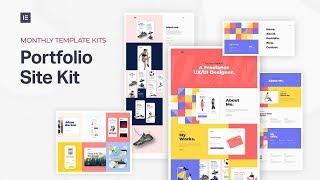
Elementor Template Kit #3: Portfolio Site Kit
Added 111 Views / 0 LikesElementor presents: The Portfolio Template Kit for WordPress: https://elementor.com/blog/portfolio-site-template-kit/ This kit has everything you need for a great portfolio website: Homepage, Popup Menu, Header, Footer, 404, Blog Archive & Single, and more! Why love this kit? - Popup menu. The kit includes a unique popup menu using Elementor's Popup Builder. - Animated 404 page. Visit the 404 page and get inspiration for a really creative slideshow. -
-
03:45 Popular

What Is a Media Kit? (And How to Create One)
Added 111 Views / 0 LikesIn today’s video, we're going to learn about media kits and how you can create your own. Blog post: https://www.elegantthemes.com/blog/marketing/what-is-a-media-kit-and-how-to-create-one Like us on Facebook: https://www.facebook.com/elegantthemes/
-
1:50:24 Popular

How To Create A Business Website With WordPress Using Brizy And Astra
Added 111 Views / 0 LikesHow To Create A Business Website With WordPress Using Brizy And Astra https://youtu.be/DG_Uj_92K9g //* Link to SiteGround hosting discount (aff): https://wplearninglab.com/go/siteground001 Link to download Brizy page builder: https://wplearninglab.com/go/brizy001 Link to download Astra theme: https://wplearninglab.com/go/astra001 Link to resources page: https://wplearninglab.com/resources Link to Brizy overview video: https://youtu.be/uEFkdBhEIqc Link









