Wordpress
-
03:42 Popular

So organisieren wir unsere Arbeit | Tag #5 || 31 Videos in 31 Tagen
Added 104 Views / 0 LikesHeute zeige ich euch kurz, welche Tools wir hilfreich finden und täglich nutzen, um unsere Arbeit im Homeoffice und als kleines Team zu organisieren. Welche Tools nutzt du für die Organisation und für to-do Listen? --- Unsere Website: http://www.elmastudio.de/ Unsere WordPress Themes: http://www.elmastudio.de/wordpress-themes/ Twitter: https://twitter.com/ellenbauer/ Facebook: http://www.facebook.com/elmastudio Instagram: https://instagram.com/elmastu
-
03:35 Popular

"Ein Tag im Leben eines WordPress Theme Entwicklers" | Tag #4 || 31 Videos in 31 Tagen
Added 118 Views / 0 LikesSo sieht mein Alltag als WordPress Theme Entwickler aus :) (Neuseeland Sommer Edition, Januar 2017) --- Unsere Website: http://www.elmastudio.de/ Unsere WordPress Themes: http://www.elmastudio.de/wordpress-themes/ Twitter: https://twitter.com/ellenbauer/ Facebook: http://www.facebook.com/elmastudio Instagram: https://instagram.com/elmastudio Musik von https://soundcloud.com/aka-dj-quads/tracks
-
09:18 Popular

Elmastudio Q&A (English) | Day #3 || 31 Videos in 31 Days
Added 114 Views / 0 LikesIt's the first video in English of my "31 videos in 31 days! video challenge. So I decided to answer some of your questions you sent me via Twitter earlier in December. I hope you enjoy my answers, it's a mix of questions regarding WordPress in general, WordPress themes, contributing to WordPress, the future of premium WordPress themes, CMS, skills you need as a WordPress developer and the process of theme development. Please let me know, if you have
-
08:14 Popular

Elmastudio Fragen beantwortet | Tag #2 || 31 Videos in 31 Tagen
Added 121 Views / 0 LikesIch hatte im Dezember via Twitter nach euren Fragen an uns/Elmastudio gefragt und die ersten habe ich im heutigen Video beantwortet. Da es noch einige Fragen mehr sind und ich euch nicht überladen möchte :) werde ich in den kommenden Tagen einfach noch weitere Q&A Videos machen (auch auf Englisch). Ich hoffe meine Antwort sind hilfreich für euch. Ich freue mich natürlich auch über weitere Fragen :) --- Unsere Website: http://www.elmastudio.de/ Unsere
-
03:57 Popular

Frohes Neues Jahr 2017! | Tag #1 || 31 Videos in 31 Tagen
Added 111 Views / 0 LikesTag 1 meiner kleinen YouTube Video Challenge. Als kleinen Neujahrsvorsatz plane ich für Januar jeden Tag ein Video hier auf unsern YouTube Kanal hochzuladen. Hier mein erstes Intro :) Happy New Year 2017!!! (die Videos werden meistens auf Deutsch, vielleicht kommen auch ein paar englische Videos dazu (mal schauen). Wenn ihr Fragen habt, die ich in den Videos beantworten soll (zu WordPress, Freelancing, Bloggen, Homeoffice, Auswanderung etc.) sagt mir
-
02:42 Popular

App Tipp #1: Die Meditations-App Calm kurz vorgestellt
Added 104 Views / 0 LikesDie Mediations App "CALM" (https://www.calm.com/) ist ein kleiner App-Tipp von mir für alle, die an Meditation und Entspannungstechniken im Arbeitsalltag interessiert sind. ------------------------------------------- Folge uns auf Twitter: https://twitter.com/ellenbauer/ Stelle Fragen auf Facebook: https://www.facebook.com/elmastudio Finde uns auf Instagram: https://instagram.com/elmastudio Unsere Snaps auf Snapchat: https://www.snapchat.com/add/elma
-
04:22 Popular
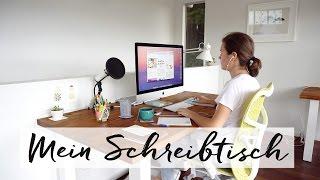
Meine Schreibtisch Tour
Added 128 Views / 0 LikesHier ein kleiner Einblick, wie wir in unserem Homeoffice bei Elmastudio arbeiten. ------------------------------------------- Mein Schreibtisch Setup: 27' iMac, schnurlose Apple Tastatur und Maus, Schreibtisch handmade, Herman Miller Mira2 Schreibtischstuhl, Rode Podcaster Mikrofon, jede Menge Tee :) ------------------------------------------- Folge uns auf Twitter: https://twitter.com/ellenbauer/ Stelle Fragen auf Facebook: https://www.facebook.com
-
08:01 Popular

Eine WordPress Webseite einrichten - so funktioniert's
Added 120 Views / 0 LikesEine kleine Anleitung, wie du dir in 5 einfachen Schritten deine eigene Webseite mit WordPress (selbst-gehostet) einrichten kannst. ------------------------------------------- Meine Top 10 WordPress-Plugins: http://www.elmastudio.de/wordpress/meine-top-10-wordpress-plugins/ Schau dir unsere Elmastudio WordPress Themes an: http://www.elmastudio.de/wordpress-themes/ Jede Menge hilfreiche Blog-Artikel zum Thema WordPress: http://www.elmastudio.de/en/blo
-
05:05 Popular

So installierst du ein Premium WordPress Theme (selbst-gehostet)
Added 107 Views / 0 LikesEin kleines WordPress Tutorial, dass dir zeigt wie man ein selbst-gehostetes Premium WordPress Theme in WordPress installiert.
-
06:24
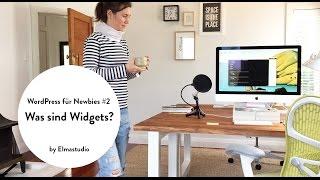
WordPress für Newbies: Was sind Widgets?
Added 97 Views / 0 LikesIm Video erklärt Ellen, was Widgets und Widgetbereiche in WordPress sind und wie du deine Webseite mit Widgets individualisieren kannst.
-
05:03

WordPress für Newbies #1: Der Weiterlesen Tag
Added 93 Views / 0 LikesIm Video erklärt Ellen, wie man den Weiterlesen-Tag in WordPress nutzen kann.
-
06:00 Popular

Den WordPress Gutenberg Editor deaktivieren, so funktioniert's
Added 124 Views / 0 LikesWenn du den WordPress Gutenberg Editor noch nicht auf deiner WordPress Webseite einsetzen kannst oder möchtest, ist das "Disable Gutenberg" Plugin hilfreich. Im Gegensatz zum "Classic Editor" Plugin kannst du Gutenberg auch für alle Seiten, Beiträge oder auch nur für einzelne Nutzergruppen (z.B. Autoren, Editoren, Admins) deaktivieren/aktivieren. Ich zeige im Video kurz, wie das Plugin funktioniert. ---- Links zum Video: Disable Gutenberg Editor: http
-
07:05 Popular

WordPress Themes: A Color Palette for Gutenberg
Added 117 Views / 0 LikesLearn how to add a custom color palette for your WordPress theme in the new Gutenberg editor. Do you like the tutorial? Then please subscribe to our channel and leave a comment to let me know your ideas for future videos. I would love to hear your feedback and ideas. Links from the video: Gutenberg handbook: https://wordpress.org/gutenberg/handbook/designers-developers/developers/themes/theme-support/ Have a look at the new WordPress editor: https://w
-
07:47 Popular

WordPress Hosting Recommendations 2019
Added 135 Views / 0 LikesDo you want to start your first self-hosted WordPress website? Are you unsure which hosting provider is the best for you? I quickly show you which hosting providers we usually recommend for our WordPress theme users and what you need to look out for when choosing a WordPress hosting provider. Our recommended hosting providers are: Siteground: https://www.siteground.com/ Bluehost: https://www.bluehost.com/ Cyon: https://www.cyon.ch/webhosting/ (Swiss h
-
05:20 Popular

How to deactivate the WordPress Gutenberg Editor
Added 123 Views / 0 LikesYou want to use the latest Wordpress 5+ version, but are not ready for the new Gutenberg editor? Don't worry, you can just install the "Classic Editor" plugin, switch back to the classic editor this way and deactivate Gutenberg. You can even choose to use the Gutenberg editor just at some times (e.g. for your posts but not for your pages). The Classic editor plugin will be officially supported until Dec 31, 2021. --- Links from the video: Classic edit
-
04:31 Popular

Online-Leseliste abarbeiten - Meine Tipps
Added 113 Views / 0 LikesIch speichere ständig spannende Blogbeiträge, komme aber nie dazu sie zu lesen. Daher ist einer meiner Vorsätze fürs neue Jahr ist die bessere Organisation meiner Online Leseliste. Hier sind meine Tipps, um Beiträge aus dem Weg auch wirklich zu lesen und nichts wichtiges zu verpassen. Links zum Video: Pocket: https://getpocket.com/ Instapaper: https://www.instapaper.com/ Credit: Thumbnail Icon: Made by Freepik from www.flaticon.com --- Unsere Website:
-
13:17 Popular

How to get started as a WordPress freelancer
Added 116 Views / 0 LikesIt can be difficult to start out as a WordPress freelancer. How do you get first clients? How do you start to build up your client base? What can you do to connect to others in the WordPress community? We also started out as WordPress freelancers back in 2008/09, so I prepared a list of tips to help you get your WordPress freelancer career started. Helpful links for WordPress freelancers: WordPress meetups: https://www.meetup.com/topics/wordpress/ Wor
-
11:17 Popular

WordPress Theme Auswahl in 2019 - meine Tipps
Added 113 Views / 0 LikesWelches WordPress Theme ist das richtige für mich? Auf was muss ich achten? Wo finde ich ein passendes WordPress Themes? Gibt es etwas, was ich unbedingt bei der WordPress Theme Auswahl vermeiden sollte? Was ist ein Gutenberg Theme? Funktioniert mein Theme mit WordPress 5? Hast du dir diese Fragen auch schon gestellt? Dann bist du hier genau richtig! Hier sind meine Tipps zur Auswahl eines passenden WordPress Themes. --- Links zum Video: - WordPress.o
-
14:17
WordPress Hosting Empfehlungen 2019 (Deutsch)
Added 99 Views / 0 LikesDu möchtest eine WordPress-Webseite aber weißt nicht, welcher Hostinganbieter der richtige für dich ist? Dann schau dir mein Video an, um zu erfahren, welche Hosting wir für WordPress Webseiten empfehlen. -- Links aus dem Video: - Hosting Empfehlungen auf WordPress.org: https://wordpress.org/hosting/ - Bluehost: https://www.bluehost.com/wordpress/wordpress-hosting - Siteground: https://www.siteground.com/wordpress-hosting.htm - GoDaddy: https://www.go
-
05:18 Popular

Premium WordPress Theme Installation - so funktioniert's
Added 141 Views / 0 LikesIm Video zeige ich wie du ein kostenpflichtiges WordPress Premium Theme installierst. Wenn du Fragen hast oder Ideen für weitere WordPress Anleitungen, sag mir einfach im Kommentarbereich Bescheid. Ich freue mich von dir zu hören.
-
05:41

What's new in our Pukeko WordPress Theme v1.2.0
Added 99 Views / 0 LikesThe new Pukeko theme version comes with some awesome new theme options, a complete design update and better Gutenberg editor support. --- Watch the video in German language here: https://youtu.be/A2bCx6PsJ20 --- Get the Pukeko Theme: https://www.elmastudio.de/en/themes/pukeko/ Test the Gutenberg Editor: https://wordpress.org/gutenberg/ --- Our Website: http://www.elmastudio.de/en/ Our WordPress Themes: http://www.elmastudio.de/en/themes/ Twitter: http
-
05:21

Was ist neu im Pukeko WordPress Theme v1.2.0
Added 77 Views / 0 LikesNeue Features, ein verbessertes Design und Optimierung des Gutenberg Supports - das alles gibts im neuesten Update unseres Pukeko WordPress Theme. --- Hol dir das Pukeko Theme: https://www.elmastudio.de/wordpress-themes/pukeko/ Teste Gutenberg: https://wordpress.org/gutenberg/ Erfahre mehr über den Gutenberg Editor auf unserem Blog: https://www.elmastudio.de/blog/ --- Unsere Website: http://www.elmastudio.de/ Unsere WordPress Themes: http://www.elmast
-
06:06 Popular
Den WordPress Gutenberg Editor deaktivieren - so funktioniert's
Added 115 Views / 0 LikesIn Kürze wird WordPress einen neuen Editor mit dem Projektnamen Gutenberg bekommen. Wenn du noch nicht sicher bist, ob deine Webseite für Gutenberg vorbereitet ist und du den neuen Editor noch nicht oder nur teilweise nutzen möchtest, kannst du das ganz einfach mit Hilfe eines Plugins tun. Ich zeige dir im Video wie du den Gutenberg Editor ganz einfach deaktivieren oder nur teilweise nutzen kannst. Links aus dem Video: - Classic Editor Plugin: https:/
-
10:29 Popular

Praktische Gutenberg WordPress Editor Funktionen kurz vorgestellt
Added 106 Views / 0 LikesDamit wir uns alle als WordPress Nutzer besser auf den neuen WordPress Gutenberg Editor vorbereiten können, zeige ich in meiner kleinen Gutenberg Videoserie hilfreich Tipps und Tricks rund um Gutenberg. Im heutigen Video zeige ich die folgenden Gutenberg Features: 1. der Gutenberg Vollbildmodus 0:47 2. mehrere Blocks als wiederverwendbares Block Set speichern 1:54 3. wiederverwendbar Blocks exportieren und importieren 3:56 4. wiederverwendbare Blocks
-
05:21 Popular
Let's test Gutenberg! Take part in the WordPress Gutenberg editor survey
Added 135 Views / 0 LikesWe can all help to improve the new WordPress Gutenberg editor. A great way to give feedback is the survey the Gutenberg team prepared for us. I show you how you can take part and what you need to get started completing the Gutenberg survey. Helpful Links from the video: - Gutenberg survey: https://wordpressdotorg.polldaddy.com/s/gutenberg-usability-test-09-18 - Gutenberg WordPress editor: https://wordpress.org/plugins/gutenberg/ - Local WordPress inst
-
10:10 Popular

Get Ready For The New WordPress Gutenberg Editor
Added 128 Views / 0 LikesIn this video I explain some of my favourite WordPress Gutenberg editor features of the current 3.7 Gutenberg plugin version: 1. How to change permalinks in Gutenberg 1:40 2. Unified Toolbar explained 2:47 3. How to remove multiple Gutenberg blocks at once 3:55 4. View the content structure, word, paragraph and block count. 4:31 5. How to change the post author in the Gutenberg editor 5:30 6. The Spotlight mode explained 6:28 7. Using Shortcuts e.g. f
-
10:17 Popular

How We Use SLACK In Our Remote Team
Added 152 Views / 0 LikesSince we work as a remote team, we love Slack to communicate and organise our work together. Here is a short walk-through on how we use the Slack app and some helpful tips to get you started. What are your Slack tips and how do you use the app? I would love to hear your feedback, suggestions and tips. --- Slack App: https://slack.com/ Our Website: http://www.elmastudio.de/en/ Our WordPress Themes: http://www.elmastudio.de/en/themes/ Twitter: https://t
-
15:46 Popular
WordPress: Standard Gutenberg Blocks Explained
Added 160 Views / 0 LikesSince we prepared our WordPress theme "Pukeko" to support the Gutenberg plugins (version 2.8), I created a little video to show you all currently available standard Gutenberg blocks. I really like the new editing experience Gutenberg offers already. What are your thoughts on the upcoming changes to WordPress that Gutenberg will bring: Are you excited? Do you have questions? Please let me know in the comments below! -- Helpful Links from the Video: Gut
-
07:19
WordPress Theme mit eigenem CSS anpassen
Added 99 Views / 0 LikesSo kannst du mit Hilfe des Browser Inspectors und eigenem CSS (im WordPress Customizer) kleiner Anpassungen an deinem WordPress Theme selbst umsetzen. --- Unsere Website: http://www.elmastudio.de/ Unsere WordPress Themes: http://www.elmastudio.de/wordpress-themes Twitter: https://twitter.com/ellenbauer/ Facebook: http://www.facebook.com/elmastudio Instagram: https://instagram.com/elmastudio
-
07:11

Inspiration comes in Waves
Added 97 Views / 0 LikesI had some thoughts regarding inspiration and why we all feel inspired sometimes and at other times it's super difficult to get inspired to do creative work. Especially if we are busy with work or don't feel as well otherwise. How do you get inspired or what do you do, if you are not feeling inspired? I would love to hear your feedback on this topic, since I think it's important especially for freelancers or everyone working from home who has to self-









