Elegant Themes
-
07:34 Popular

Converting HTML Sites to WordPress Sites
Added 141 Views / 0 LikesLearn how to convert your HTML website into a WordPress website! Blog post: https://www.elegantthemes.com/blog/tips-tricks/converting-html-sites-to-wordpress-sites Like us on Facebook: https://www.facebook.com/elegantthemes/
-
10:46 Popular

Countdown Timer Module
Added 140 Views / 0 LikesThe Countdown Timer module creates a visual timer that counts down to a specific date. This is great for creating a "coming soon" page to builds anticipation for a new product or service. When combined with a "blank page," this can also be used as a great "coming soon" landing page/maintenance mode page. It is important to be able to let your visitors know when something is going to be launched or an event is going to occur. Simply set the date and ti
-
10:20
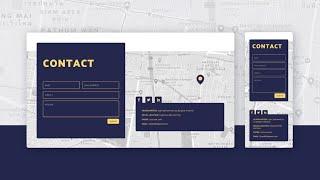
Create a Floating Contact Section with Divi Scroll Motion Effects
Added 66 Views / 0 LikesEvery website needs a contact section, but that doesn’t mean you need to go for a standard design. With Divi’s scroll effects, you can create a floating contact section that will stand out. Improve your user interaction with a vertical scrolling contact section layout that will invite visitors to engage with your contact form. In this post, we’ll show you how to create a full width floating contact section that you can add to any page. You could even
-
18:18
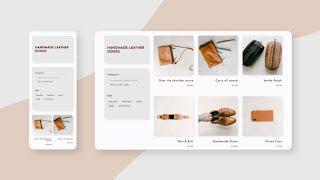
Create a WooCommerce Product Category Page with Divi’s Theme Builder
Added 83 Views / 0 LikesCategory pages are an important part of any eCommerce site. Clients browse product categories to find what they need. That’s why your category pages need to look just as good as your product pages. With Divi’s Theme Builder, creating category page templates is easier than ever. In this tutorial, we’ll show you how to create a category page template step by step and style it using Divi’s built-in options. Furthermore, we’ll show you how to make it filt
-
05:41
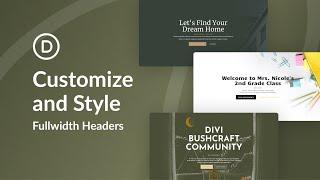
Create and Style A Real Estate Header In Divi!
Added 57 Views / 0 LikesDivi’s Fullwidth Header module makes it easy to design a stunning hero section for your website in just minutes. A hero section is the very first section of your website that your visitors will see, so you’ll want it to be branded, informative, and compelling. Thankfully, the Divi Fullwidth Header comes packed with content options: header text, subtitle text, body text, two images, and two buttons. We’ll be utilizing all of these elements in our fullw
-
47:46 Popular

Create Dynamic Pricing Tables with Our Exclusive Black Friday Software Sale Landing Page
Added 158 Views / 0 LikesMultistreaming with https://restream.io/ One of the exclusive landing pages we’re providing you with as Lifetime Members and new Black Friday customers are the stunning Software Sale landing page. This landing page will surprise you with its unique section dividers and high-quality mockups. In this article we’ll show you how to use Divi’s dynamic content feature to add dynamic pricing tables to it! Read the article here: https://www.elegantthemes.com/
-
54:49 Popular
Creating 3 Image Gallery Designs Using Divi’s New Column Layouts
Added 132 Views / 0 LikesMultistreaming with https://restream.io/ Hey Divi Nation, welcome to a brand new Divi Use Case live stream. Divi's new column layouts have freed up some exciting possibilities for unique page designs. And with the support of up to six columns, you can really explore new designs for image galleries. In this use case tutorial, I'm going to show you how to design three unique layouts for your images. I think you will be surprised by how easy these layout
-
07:01 Popular

Creating a Client Resources Page for Your Clients
Added 124 Views / 0 LikesOnce a website is live and a project is complete, it can be very easy to let a client slip away potentially stopping a client from purchasing more of your products or services. One way to keep your clientele engaged is to offer them a "Client Resources" page with free information, training, and resources on ways they can market or grow their web presence. Here is the post: https://goo.gl/tlkigW
-
08:02 Popular

Creating a Comment Policy for Your Brand (And Why It's Important) - Divi Nation Short
Added 138 Views / 0 LikesThe main topic of this episode is creating a comment policy. Something I felt was important for the Divi Community at large since it's made up of a lot of smaller groups, brands, and businesses. That's why in this Divi Nation Short I talk about how we here at Elegant Themes went about creating our comment policy and share some tips for how you might want to create your own. View the accompanying blog post: https://www.elegantthemes.com/blog/divi-resou
-
09:03 Popular

Creating a Custom WordPress Dashboard for Your Clients.
Added 115 Views / 0 LikesIn this video, we will be Creating a Custom WordPress Dashboard for Your Clients. When you turn a website over to a client to edit and maintain, they are going to have many questions. Even making basic content changes requires some knowledge on WordPress and Divi. What better way to save you from numerous potential questions than to have a custom dashboard with links and resources that the client can have access to every time they log into their site!
-
30:43 Popular

Creating a Divi Educational Business featuring Michelle Nunan - The Divi Nation Podcast, Episode 32
Added 183 Views / 0 LikesIn this episode our host Nathan B. Weller talked with Michelle Nunan of Divi Soup and Divi Academy. Michelle is based out of the UK and has been a big part of the online Divi Community for a long time. Her specialty (and her business) is Divi education. Meaning Divi tutorials, tips, and ecourses. She’s one of a small but growing group making their living teaching Divi instead of using it for client work or creating Divi-related tools (such as plugins/
-
09:39 Popular
Creating a Fullscreen Layout with Parallax Background Image Transitions in Divi
Added 144 Views / 0 LikesCreating a web page with fullscreen sections is a great way to improve the user experience with smooth transitions and clean section layouts that span the full width and height of the browser. Typically, this works well for showcasing products or services one section at a time allowing the user to easily focus on each one while scrolling down the page. This type of design also works really well with background images that speak to the content and prov
-
06:29 Popular

Creating a Grayscale to Color Gallery with the Divi Gallery Module
Added 152 Views / 0 LikesBy the end of today's quick tip, we’re going to achieve this stylish grayscale gallery that blossoms with color as users hover their cursor over each image. Here is the link to the blog post: https://www.elegantthemes.com/blog/divi-resources/creating-a-grayscale-to-color-gallery-with-the-divi-gallery-module
-
09:56 Popular

Creating a Moving Forward Page for Your Clients
Added 133 Views / 0 LikesIn this video, I will be showing you how to create a Moving Forward Page for Your Clients. Similar to my getting started page, I created a video of me overviewing the page to give it a more personalized touch. I also add a graphic element to each recommendation to help visually guide my client through the process. Here is the link to the post: https://goo.gl/o4D3MH
-
12:33 Popular

Creating a Polaroid Hero Section with Divi’s Transform Options
Added 132 Views / 0 LikesCreative hero sections make websites memorable and special. This polaroid hero section design evokes a sense of vintage wanderlust. By using column transform options, the polaroids can be arranged in any way you want, as if they were spread on a table. You can recreate this polaroid hero section design with your own square images. You’ll be able to download the JSON file for free as well! Read more: https://www.elegantthemes.com/blog/divi-resources/cr
-
21:46

Creating a Striking Navigation Dashboard with Divi’s New Column Structures
Added 100 Views / 0 LikesLooking for a new and unique way to structure your homepage? Creating a navigation dashboard might be the way to go. In this tutorial, we’re going to show you how exactly you can achieve a stunning dashboard page which you can use for many purposes. Whether you want to change the way people navigate on your page, or you want to highlight services your company offers, creating a dashboard will help you achieve exactly what you had in mind. We’re using
-
26:14 Popular
Creating a Stunning Fixed Icon Navigation with Divi
Added 116 Views / 0 LikesMultistreaming with https://restream.io/ Every week, we provide you with new and free Divi layout packs which you can use for your next project. For one of the layout packs, we also share a use case that’ll help you take your website to the next level. This week, as part of our ongoing Divi design initiative, we’re going to show you how to create stunning fixed icon navigation using Divi’s Risk Management Layout Pack. We’ll combine this fixed icon nav
-
05:13 Popular

Creating a Unique Border for your Divi Gallery Module Images
Added 127 Views / 0 LikesIn this quick tip, we’re going to be using a CSS “clipping mask” to create a nifty little border around our gallery images. If you’re not too familiar with CSS, don’t worry, I’ll provide the code and explain what it’s for and how to use it. If you’re new to CSS, my goal is to make it a little less daunting and for you to see how just a few lines of code can take your designs to the next level. Here is the link to the post: https://www.elegantthemes.co
-
11:43 Popular
Creating a Website Questionnaire and Documentation for your Clients
Added 137 Views / 0 LikesCreating a Website Questionnaire and Documentation for your Clients. In this series, we’re branching out from a typical module or Divi design tutorial by showing you 5 ways you can create Client Documentation with the primary purposes of educating and empowering your clients and in the process, saving you time. Here is the link to the post: https://www.elegantthemes.com/blog/divi-resources/creating-a-website-questionnaire-and-documentation-for-your-cl
-
18:42
Creating an Interactive Question Card Grid for Your Next About Page with Divi
Added 94 Views / 0 LikesEvery week, we provide you with new and free Divi layout packs which you can use for your next project. For one of the layout packs, we also share a use case that’ll help you take your website to the next level. This week, as part of our ongoing Divi design initiative, we’re going to show you how to create an interactive question card grid for your next about page with Divi. We’ll be using the Internet Service Provider Layout Pack’s about page but you
-
18:18 Popular

Creating an “Our Process” Section with Divi’s New Column Structures
Added 108 Views / 0 LikesDivi’s new column structures have undeniably added a ton more built-in design possibilities to Divi. To show you how unique you can get with Divi’s versatile column structures, we’re going to show you how to create a unique “our process” section using Divi’s built-in options only. On top of that, we’ll also add a subtle hover effect that appears when hovering one of the steps in the process. These sections are great for explaining how you do what you
-
23:53 Popular

Creating Animated Titles Using Divi’s Hover Options
Added 112 Views / 0 LikesEvery week, we provide you with new and free Divi layout packs which you can use for your next project. For one of the layout packs, we also share a use case that’ll help you take your website to the next level. This week, as part of our ongoing Divi design initiative, we’re going to show you how to create animated titles using Divi’s hover options and the Driving School Layout Pack. This is a great approach for putting different parts of your copy in
-
15:33 Popular
Creating Custom Column Side Navigation for One Pagers with Divi
Added 119 Views / 0 LikesWhen you decide to create a one-pager, the navigation user experience becomes entirely different. Although people aren’t meant to leave the page, you do want to make their stay user-friendly. That’s why most one-pagers use in-page anchor links. You can place these anchor links in a traditional top menu or choose side navigation instead. In this tutorial, we’re going to show you how to create a beautiful column side-navigation design for your page usin
-
42:13 Popular

Creating Effective Content For Your Brand with Randy Brown – The Divi Nation Podcast, Episode 54
Added 218 Views / 0 LikesIn this episode I interview Randy Brown, a longtime contributor to the Elegant Themes blog, a content service provider to the Divi Community, and avid user/tester/and reviewer of not only Elegant Themes products but the whole burgeoning Divi market. In the course of our conversation we learn Randy’s story, learn about how he approaches creating the truly monumental amount of written content he produces, and he and I both share some tips for those look
-
22:04 Popular

Creating Endless Horizontal Swipe Cards for Mobile with Divi
Added 121 Views / 0 LikesSwiping through content is something almost everyone does on a daily basis. It has basically become second nature so it goes without saying that adding it to your website can help improve the overall user experience. In this post, we’ll show you how to create endless horizontal swipe cards that are mainly focused on mobile and tablet devices, where touch is involved. Although this is a mobile-first tutorial, the outcome will work great on desktop as w
-
16:49 Popular

Creating Inline Scroll Reveals with Divi
Added 133 Views / 0 LikesEvery week, we provide you with new and free Divi layout packs which you can use for your next project. For one of the layout packs, we also share a use case that’ll help you take your website to the next level. This week, as part of our ongoing Divi design initiative, we’re going to show you how to create beautiful inline scroll reveals using the DJ Layout Pack. This is a great way to draw attention to one specific column container on your website, w
-
04:05 Popular
Creating Mega Menus In Divi
Added 117 Views / 0 LikesMega menus allow users to see more links all at once without the hassle of scrolling, hovering, and remembering the contents of your menu. A good way to think about Mega Menus is that they are drop down menus within drop down menus. So instead of your normal dropdown menu which shows a submenu when hovering over your main parent links in your navigation bar, a megamenu allows you to have additional parent links and submenus within the dropdown menu. V
-
13:06 Popular

Creating Pop Out Service Descriptions on Hover with Divi
Added 111 Views / 0 LikesCreating pop out service descriptions on hover can be an effective way to inform and engage users with additional information. Much like a tooltip, these pop out descriptions will reveal more info about your service on hover. But with Divi, you have the full suite of design tools available in the Divi builder to create stunning pop out designs without any additional custom CSS. In this tutorial, we will show you how easy it is to build pop out service